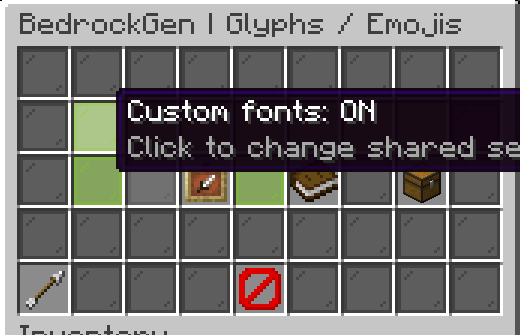
Custom fonts on
ON: your plugin's emojis are converted into the Bedrock pack.
OFF: no emojis on Bedrock at all, and every switch below turns grey.
Answer four questions and get the install for your server only: the files you need, the config to change, and the commands to run. The rest of the wiki is on hold until you finish or skip.
BedrockGen converts the Java resource pack your content plugin already builds into a Bedrock pack, plus the Geyser mappings that go with it. Bedrock players then see the same items, blocks, armor and furniture your Java players see.
It reads Oraxen, ItemsAdder, Nexo, CraftEngine and EcoItems packs directly. Build content the way you already do and convert whenever the pack changes.
Go through First install once, then Converting a pack. After that, converting again is two commands; the output reaches Geyser by itself.
Buying BedrockGen funds compatibility work, testing and new converters. If you want to sponsor development, donate or discuss a partnership, contact us directly.
You can reach us in two places, and you get the same support in either one. Pick whichever you're already in:
If something came out wrong, tell us the name of the item, block or furniture and add a screenshot of it in game. Without a name we're guessing at which model you mean.
Three files, one job each.
| File | Runs on | Its one job |
|---|---|---|
BedrockGen.jar | Paper | Converts. Reads the pack your content plugin already builds and writes plugins/BedrockGen/output/: the Bedrock pack set and the Geyser mappings. |
BedrockGen-Int.jar | Paper | Delivers and drives. Sends the output to Ex, and handles what only the server knows: custom elytras, backpacks, block-breaking speed, ModelEngine / BetterModel models. |
BedrockGen-Ex.jar | Geyser (extension) | Shows. Serves the pack to Bedrock players and draws furniture, display entities and models for them. |
BedrockGen-Int writes one line, secret: "bgx3:…", in plugins/BedrockGen-Int/secrets.yml. Paste it as id1 in extensions/bedrockgen_ex/secrets.yml where Geyser runs and run /bedrockgenint sync. From then on every conversion reaches
Geyser by itself. Step by step →
Bedrock clients cache the pack. If a player still sees the old pack after a conversion, they rejoin once; if the console asked for a Geyser restart, restart it once.
Three files. Two go on the Paper server, one goes where Geyser runs. Then copy one line to link them — no port, no address.
| File | Goes into | What it is |
|---|---|---|
BedrockGen.jar | Paper: plugins/ | The converter. Reads your content plugin's pack and writes the Bedrock pack. |
BedrockGen-Int.jar | The same Paper: plugins/ | Server side of the runtime: delivers the output to Geyser, custom elytras, backpacks, block-breaking, models. |
extensions/BedrockGen-Ex.jar | The Geyser host: its extensions/ folder | Geyser side of the runtime: serves the pack, draws furniture, entities and models for Bedrock players. |
One licence for all three. On a network, put BedrockGen and Int on every
backend you convert and Ex once, where Geyser runs. Something missing? /bedrockgenint sync
says what.
| Step | Where | Do |
|---|---|---|
| 1 | Paper | BedrockGen-Int writes its line in plugins/BedrockGen-Int/secrets.yml: secret: "bgx3:…" |
| 2 | Geyser | In extensions/bedrockgen_ex/secrets.yml, paste its value as id1: "bgx3:…" and save. No restart. |
| 3 | Paper | Run /bedrockgenint sync. It answers installed on … |
Done. Every conversion from now on reaches Geyser by itself.
A sync that fails says so in a framed box, on Paper's console (and to ops in game) and on Geyser's console: the reason and the one thing to do. Another line says when it works again.
The line works with your licence only. Several Geysers: paste the same line in each.
Each Paper server with BedrockGen has its own line. Put them all in the Geyser's secrets.yml,
one id each:
# extensions/bedrockgen_ex/secrets.yml
secrets:
  id1: "bgx3:…"    # from lobby - wins
  id2: "bgx3:…"    # from survival
Their packs become one. Where two define the same thing, id1 wins. Converting or running
/bedrockgenint sync on any server replaces only that server's part; the others stay as they are.
A server leaves the merge when its line is taken out. Old files in secret/ move into
secrets.yml by themselves, with the same lines.
This is cloud sync. Prefer a direct connection? →
Instead of cloud sync. In both config files, set sync.mode: direct; the
direct: section under it is used then. Then:
Int (on Paper) sends the pack to Ex (beside Geyser). All it needs is where Ex is: an
address and a port. Find your setup and write that one line in
plugins/BedrockGen-Int/config.yml.
| Where Geyser runs | Write in Int's direct: |
|---|---|
| Geyser-Spigot, on the same Paper server | nothing |
| Geyser Standalone or a proxy, on the same machine as Paper | address: "127.0.0.1" |
| In Docker, or another machine on your network | the address Paper reaches it on, e.g. address: "172.18.0.1" — not the public IP |
| Another machine over the internet | its public IP, e.g. address: "203.0.113.10" |
| Several Geysers | one line per Geyser under targets: — see More than one Geyser |
The port is the same number in both files. Example — Paper and Geyser Standalone
on one machine:
# Geyser: extensions/bedrockgen_ex/config.yml
direct:
  port: 8801

# Paper: plugins/BedrockGen-Int/config.yml
direct:
  address: "127.0.0.1"
  port: 8801
Restart both, then check on Paper:
/bedrockgenint sync
sync: 127.0.0.1:8801 - done (213 files, 6.0 MB)
The address you write is the one Int uses. unreachable means
that address or port cannot be reached from Paper: check the address, and that the port is the
same in both files and open.
Put BedrockGen and Int on every backend you convert, and Ex once per Geyser. Name each Ex in
Int's targets (plugins/BedrockGen-Int/config.yml); every conversion then
sends the pack to all of them. /bedrockgenint sync sends to all,
/bedrockgenint sync lobby to one, with one line per Geyser.
direct:
  targets:
    lobby:
      address: 10.0.0.2
      port: 8801
    survival:
      address: 10.0.0.3
port: 8801Put Geyser-Spigot.jar in plugins/.
BedrockGen-Ex.jar goes in plugins/Geyser-Spigot/extensions/.
A reload is not enough because Geyser reads extensions only at startup.
Int and Ex are in the same server. Every conversion installs its output straight into Geyser, and Bedrock players get it on their next join.
Use Geyser-Velocity or Geyser-BungeeCord. Put BedrockGen-Ex.jar in that
Geyser installation's extensions/ folder.
Install Floodgate on the proxy and each backend that runs BedrockGen. In the proxy's
Floodgate config, set send-floodgate-data: true.
key.pemCopy the proxy's key.pem into every backend Floodgate folder. Do not let
each backend keep a separately generated key.
Ex listens on the port in its config on the proxy, extensions/bedrockgen_ex/config.yml
— any free port you like:
direct:
  port: 8801        # example - pick any free port and open it to the backends
Allow that port from every backend that runs BedrockGen: Int on the backend connects to the
proxy, never the other way round. Put the same number on each backend, in
plugins/BedrockGen-Int/config.yml:
direct:
port: 8801 # the same port as in ExOn the backend, in plugins/BedrockGen-Int/config.yml, the proxy's address as
the backend reaches it (the LAN or Docker address when both are on one network, not the
public one) and the port from Ex:
direct:
  address: "10.0.0.2"   # example - the proxy machine, where Geyser and Ex run
  port: 8801            # the same port as in Ex
Written here, this is the address Int always uses.
That one file, on your Paper server. Nothing else.
BedrockGen goes on one backend, the one you convert on. Every other backend gets Int alone, with the same address and port. Ex lives once, on the proxy.
| Machine | Runs | Its file |
|---|---|---|
proxy 10.0.0.2 | Velocity + Geyser + BedrockGen-Ex.jar | extensions/bedrockgen_ex/config.yml → port: 8801 |
lobby 10.0.0.11 | Paper + BedrockGen.jar + BedrockGen-Int.jar | plugins/BedrockGen-Int/config.yml → address: "10.0.0.2", port: 8801 |
survival 10.0.0.12 | Paper + BedrockGen-Int.jar | the same address and port |
Convert once, on the backend that has BedrockGen: the pack goes to Geyser, and a
backend with Int alone fetches what it needs (the custom-elytra data) from Ex when it
starts and on /bedrockgenint sync. With several Geyser hosts written in
Int, the output goes to all of them without asking. A different pack per backend needs
a Geyser per pack — see More than one Geyser.
/bedrockgenint syncLinked, with the address and port above:
sync: 10.0.0.2:8801 - done (213 files, 6.0 MB)unreachable means the port is not open from that backend, or the address is
wrong; the same address and port can also be set from the console, and it is saved:
/bedrockgenint delivery use 10.0.0.2:8801Geyser Standalone is a separate program, not a Paper plugin. Put its jar in a dedicated folder and start it once.
BedrockGen-Ex.jar goes in that Standalone folder's
extensions/ directory.
Set the Java server address and port in Standalone's config.yml. If you use
Floodgate authentication, install Floodgate on Paper, set auth-type: floodgate,
and copy Paper's key.pem beside the Standalone jar.
Ex listens on the port in extensions/bedrockgen_ex/config.yml beside Standalone
— any free port; allow it from the Paper server, and put the same number in
plugins/BedrockGen-Int/config.yml on Paper:
direct:
  port: 8801        # example - the same number in both files
Standalone on the same machine as Paper: nothing to open.
On Paper, in plugins/BedrockGen-Int/config.yml, the Standalone machine's
address as Paper reaches it (127.0.0.1 when it is the same machine) and the
port from Ex:
direct:
  address: "10.0.0.5"   # example - the machine Geyser Standalone and Ex run on
  port: 8801            # the same port as in Ex
Written here, this is the address Int always uses.
That one file, on your Paper server. Nothing else.
Standalone sits in front of the proxy. BedrockGen goes on one backend, the one you convert on; every other backend gets Int alone, with the same address and port. Ex lives once, beside Standalone.
| Machine | Runs | Its file |
|---|---|---|
geyser 10.0.0.5 | Geyser Standalone + BedrockGen-Ex.jar | extensions/bedrockgen_ex/config.yml → port: 8801 |
lobby 10.0.0.11 | Paper + BedrockGen.jar + BedrockGen-Int.jar | plugins/BedrockGen-Int/config.yml → address: "10.0.0.5", port: 8801 |
survival 10.0.0.12 | Paper + BedrockGen-Int.jar | the same address and port |
Convert once, on the backend that has BedrockGen: the pack goes to Geyser, and a
backend with Int alone fetches what it needs (the custom-elytra data) from Ex when it
starts and on /bedrockgenint sync. With several Geyser hosts written in
Int, the output goes to all of them without asking. A different pack per backend needs
a Geyser per pack — see More than one Geyser.
/bedrockgenint syncLinked, with the address and port above:
sync: 10.0.0.5:8801 - done (213 files, 6.0 MB)unreachable means the port is not open from Paper, or the address is wrong;
the same address and port can also be set from the console, and it is saved:
/bedrockgenint delivery use 10.0.0.5:8801| Command (on Paper) | What it does |
|---|---|
/bedrockgenint sync | Sends the current pack now and answers in one line: done (… files, … MB) - installed on lobby, unchanged or nothing to send, convert first. With the direct link, the address and unreachable when it does not answer. |
/bedrockgenint delivery use <ip[:port]> | Tells Int where Geyser is, once, when it did not find it on its own. |
/bedrockgenint sync <name|all> | With several Geysers under targets: sends to the one named, or to all. |
Replace the three files with the new ones and delete the old files — do not
keep them beside the new ones (for example BedrockGen-1.0.300.jar next to
BedrockGen.jar): the server may load the old copy. If one is left, the console names it
at startup:
2 copies of BedrockGen are in plugins/: BedrockGen-1.0.300.jar (1.0.300), BedrockGen.jar (1.0.326)
- this server runs 1.0.326. Keep only the newest: delete the others and restart, ...
Delete the file it names and restart. The same check runs for BedrockGen-Int and,
in Geyser's extensions/, for BedrockGen-Ex.
From 1.3.19 on, the first start puts each plugin's files in their new places — the files you edit
stay in view, everything generated moves to cache/ — and the old secret files move into
secrets.yml with the same lines. Nothing you set is lost. If a server's content went missing on an
earlier version, run /bedrockgenint sync on that server once.
That is the whole install. After a conversion there is nothing to copy: Int sends the output to Ex, and Bedrock players get it on their next join.
Prepare the source pack once, then run the two conversion commands whenever it changes.
Oraxen, ItemsAdder, Nexo, CraftEngine and EcoItems can all obfuscate or lock the pack they build. That protection stops BedrockGen from reading it too, so switch it off before you convert. Pick the plugin you use, or Resource for a resource pack of its own and Data pack for a data pack's items:
In plugins/Oraxen/settings.yml:
Pack:
  generation:
    obfuscation:
      type: NONE
    protection: false
Then reload:
/oraxen reload allNewer ItemsAdder (the beta) keeps its pack protection under resource_pack.obfuscation
in plugins/ItemsAdder/config.yml. Turn all four off:
resource_pack:
  obfuscation:
    zip_entries: false
    zip_archive: false
    png: false
    short_texture_references: false
The older switches can still be in the same file, and they count too. Turn off the zip protections:
zip:
  protect-file-from-unzip:
    protection_1: false
    protection_2: false
    protection_3: false
    short_texture_references: false
and the pack obfuscation:
resource-pack:
  protect-pack: false
  obfuscation:
    enabled: false
If you have custom armor, turn on legacy CIT as well. ItemsAdder only writes the armor textures when it's enabled, and without those textures there is nothing to convert:
zip:
  custom_armors_shaders_legacy:
    optifine:
      generate_cit:
        1_20_4_lower: true
In the ItemsAdder beta the same switch is spelled:
resource_pack:
  custom_armors_shaders_legacy:
    generate_optifine_cit_1_20_4_lower: true
Then rebuild:
/iareload
/iazip
In plugins/Nexo/settings.yml:
OBFUSCATION: NONEThen reload:
/nexo reload allCraftEngine can write a second, unprotected copy of the pack, which is what BedrockGen
should read. In plugins/CraftEngine/config.yml:
protection:
  unprotected-copy:
    enable: true
    path: "./generated/resource_pack_unprotected.zip"
Rebuild the pack, then convert that file:
/bge convert --input=./generated/resource_pack_unprotected.zipIf the unprotected copy still isn't written, switch the protection features off as well:
protection:
  crash-tools:
    method-1: false
    method-2: false
    method-3: false
    method-4: false
    method-5: false
    method-6: false
    method-7: false
    method-8: false
  incorrect-crc: false
  fake-file-size: false
  escape-json: false
  fake-directory: false
  break-texture: false
In plugins/EcoItems/pack.yml:
# Rename textures and models to hashed names inside the zip, making the
# pack much harder to rip and reuse. Purely cosmetic to players. Equipment
# and painting textures keep their names (the game finds them by
# convention), as do item definitions and sound events (items and configs
# reference them at runtime).
obfuscation: false
Then reload:
/ecoitems reloadA resource pack on its own, with no plugin behind it. Put the zip (or its folder) in
plugins/BedrockGen/resource/ and convert it by name:
/bge convert resource pack.zipTo convert it together with your plugin's pack, name both — one plugin and one pack at most:
/bge convert resource nexo pack.zipWhich one wins: the first one you name. Where both have the same item, model or texture,
the first one's is used; everything else from both is kept. To put the pack on top, swap them:
/bge convert resource pack.zip nexo. With a plugin named, its items, emojis and menus are
read too, as /bge convert nexo reads them. Tab completes the names.
Without its plugin, what is each item? A pack on its own only has the pictures and models: it does not say which Java item each one sits on (paper, a sword, a helmet…), and Bedrock needs that. BedrockGen asks the item plugins on the server (MythicMobs, MMOItems, ExecutableItems…) and the data packs; what nobody answers is asked before the conversion. To answer it from the game itself, turn on learning:
/bge learn onWhile players play, BedrockGen remembers what each custom item really is — the item it sits on, its name, the
slot it is worn in and its tooltip style — from what they hold, wear, open in menus and see on displays, frames,
dropped items and mobs near them. It stays on across restarts. Nothing in the world changes and nothing is sent
anywhere: it is kept in plugins/BedrockGen/cache/learned-items.json, and the next conversion uses it.
/bge learn shows how many items it knows, /bge learn off stops, /bge learn clear
forgets them.
Beta
The items a data pack gives out (from its loot tables, recipes, trades and commands) are converted, and its biomes too.
world/datapacks/, as a zip or a folder. If it runs on
another server of your network, copy it to plugins/BedrockGen/datapacks/ here.plugins/BedrockGen/resource/ and convert it, as in Resource:/bge convert resource pack.zipIf the result says new items were registered, restart Geyser once. Not converted yet: models drawn by shaders, and a look that a command picks while the game runs.
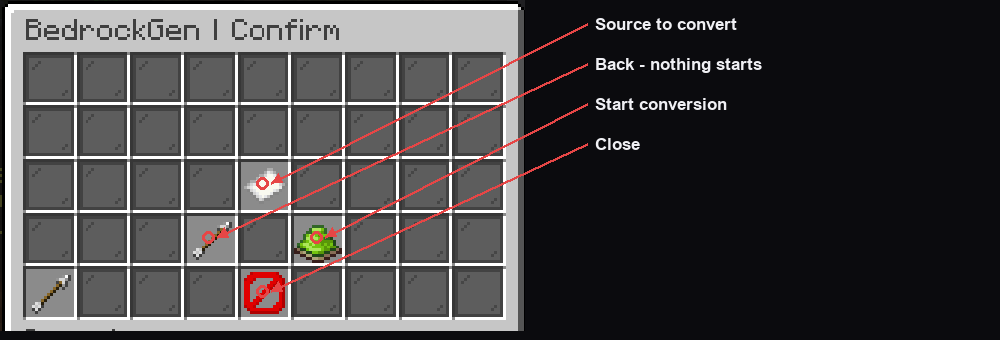
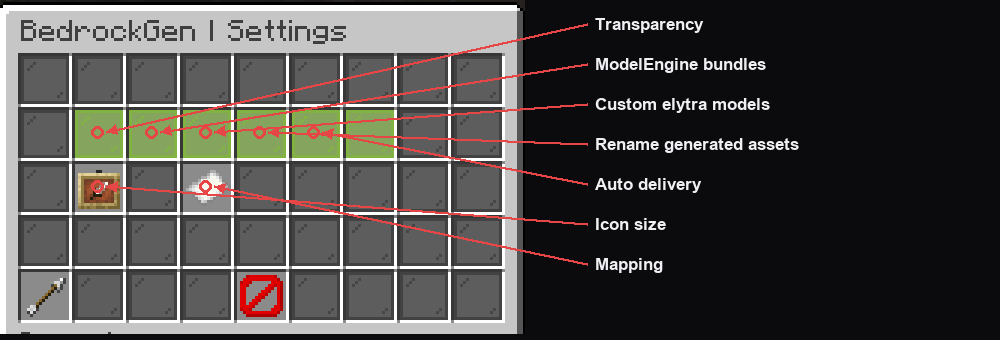
Type /bge. Everything below is that panel; the numbers on each picture match the list beside it. The command way, further down, does the same thing.
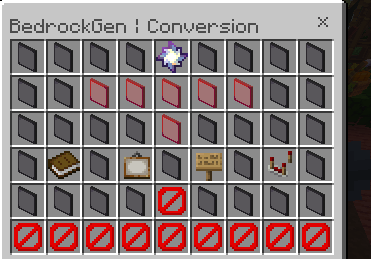
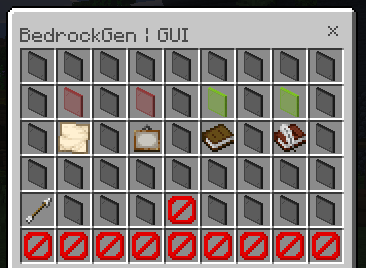
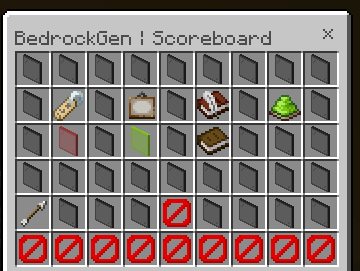
/bge gui import autoRun this before converting. It reads the custom chest menus out of every item plugin you have installed, and the conversion uses what it found — so a pack converted without it ships without them. Skip it only if your pack has no custom menus. Chest GUIs explains what it reads and why it is needed.
You can still name the plugins yourself —
/bge gui import auto oraxen,itemsadder — but with no list it takes them
all.
/bge convertA panel opens in chat. Pick which plugin built your pack and press Convert now — everything else is already set the way most servers want it. If you need something different, Change settings holds the rest, and what you pick there is remembered, so the next conversion is this one command again.
When it's done, chat prints the folder it wrote everything to, and Int has already sent it to Geyser — nothing to copy.
Two halves. The game's own HUD, as your pack retextures it, converts with the pack. The HUD plugins — BetterHud, MythicHUD, CustomNameplates, LuxDialogues, Tooltips, CustomFishing and any HUD drawn with fonts — are drawn on Bedrock by BGHud, the add-on.
What your resource pack changes in the vanilla HUD is converted by BedrockGen itself: the hotbar and its selection frame, the armor, health, air and food bars, the experience bar, the effect frames and the locator bar. Only what the pack retextures; the rest stays as Bedrock draws it.
HUD plugins draw with boss bars, the action bar and titles full of font pictures. For Bedrock players BGHud lays out each frame the way Java draws it and shows every picture and text at the same place and size. Java players are not touched.
BedrockGenUi.jar from plugins/: BGHud stays off
while it is there. Keep the plugins/BedrockGenUi/ folder — BGHud takes the server's identity
from it, so your licence counts the same servers.BGHud.jar in plugins/ and restart. The licence is already inside the download;
the console says BGHud customer startup authorized.BGHud checks the licence when the server starts, at each HUD build and once a minute per server — never per player. If novaic.net cannot be reached for about 5 minutes, the Bedrock HUD pauses (the server keeps running) and comes back by itself. Up to 4 servers at once on one licence.
Download it again where you bought it, replace BGHud.jar and restart. Keep the
plugins/BGHud/ folder: it holds the server's identity, so your licence counts the same servers. The
first start after an update may build the HUD once; the HUD pack you have stays until that build succeeds.
The console says why in one line, and Paper keeps running:
BGHud not started [BGH-step/reason], then what to do. The step tells where it stopped:
| Step | Why | What to do |
|---|---|---|
download-stamp | The jar has no licence inside. | Download your own copy where you bought it — every download carries your key. |
activationruntime-seatstartup | novaic.net could not confirm the licence. | Check that the server reaches novaic.net. HTTP-429: 4 servers already run on this licence — stop one, or wait up to 5 minutes after a crash. HTTP-403: send us the line. |
identity | The server identity saved in plugins/BGHud/ cannot be read. | Check the folder's file permissions. Do not delete its files. |
distributionruntime-unsealruntime-link | The jar is damaged. | Download it again. |
runtime-enable | The HUD could not start on this server. | Use a supported Paper (1.21 or newer) and an up-to-date PacketEvents. |
BGHud 4.0.0 could stay off on some Linux hosts and containers without that line: update to 4.0.2 or newer.
Both plugins ship with Bedrock players switched off, and then they send Bedrock players no HUD for BGHud to draw. Set this once and restart:
| Plugin | File | Set |
|---|---|---|
| BetterHud | plugins/BetterHud/config.yml | disable-to-bedrock-player: false |
| MythicHUD | plugins/MythicHUD/config.yml | disable-geyser-players: false |
Write false, not off — BetterHud does not take
off as false.
pack-hud.mcpack; the conversion says
HUD (BGUI-X): carried beside the pack as pack-hud.mcpack (… MB). The star in /bge,
BGUI-X HUD: ON (or /bge set ui_bguix off), turns that off: BGHud then puts its
pack in the Geyser on this server itself./bghud build. The new pack goes to Geyser by
itself, and Bedrock players get it when they join again. A HUD that did not change keeps its pack: nobody
downloads it again.It finds the packs by itself: each HUD plugin's own pack, and the pack ItemsAdder, Nexo, Oraxen or CraftEngine sends Java players. It reads them in place and never edits them.
| Command | What it does |
|---|---|
/bghud | The state: fonts and pictures read, Bedrock players drawn, frames sent. |
/bghud build | Builds the HUD pack again; it says kept when nothing changed. |
/bghud reload | Re-reads config.yml and the packs. |
/bghud tints on|off | While players play, learns the colour of pictures no plugin file names; the next build uses them. |
plugins/BGHud/config.yml
| Key | Default | What it does |
|---|---|---|
take.bossbartake.actionbartake.title | true | What BGHud draws for Bedrock players; false leaves that one to Geyser as it is. |
packs | [] | Extra Java packs to read. The HUD plugins' packs and the merged pack are found by themselves. |
learn-tints | false | The same switch as /bghud tints. |
pack-outputs | set at first start | Where copies of the pack go when BedrockGen does not carry it: Geyser-Spigot/packs when Geyser runs on this server. |
import-identity-from | BedrockGenUi | Takes the old HUD add-on's server identity from that folder, without changing its files. Empty = a new identity. |
Custom elytras show on Bedrock players with their own wings, and glide.
Nothing to set up: convert the pack and it works. The switch is items.elytra in plugins/BedrockGen/config.yml, on by default.
Other players gliding on an elytra are drawn gliding too, with their wings spread. It is built into BedrockGen-Ex: nothing to install.
Java's tab list, exact hex colours, Java's chat and player heads for Bedrock players - each one a switch of its own, done by BedrockGen-Ex.

Open /bge settings → Geyser enhancements and click a switch. Or set them in plugins/BedrockGen/config.yml:
geyser_enhancements:
  tab: false
  hex: false
  hex_holograms: false
  chat: false
  faces: real
  head_items: true
biomes: truereal: each player's own face; steve: Steve's face for every head (lightest).Hex needs glyphs. Exact colours are drawn as glyphs, on the glyph pages your emojis leave free; each colour on a hologram takes its own, so hex_holograms needs many more. When there are not enough, emojis come first. Hex then keeps the scoreboard and name tags first, then the tab, then holograms; what does not fit shows Bedrock's nearest colour.
BedrockGen sends the change to Geyser by itself. Players see it when they next join.

Exact colours are drawn with glyphs, and emojis get the glyph pages first. When a pack's emojis fill the pages, fewer colours fit: the scoreboard and name tags keep theirs first, then the tab, then holograms, and the rest show Bedrock's nearest colour. A colour shown for the first time is exact from the player's next join.
Hex turns each coloured text into glyphs and registers them. The scoreboard, tab, holograms and name tags show a known set of texts, so their colours fit. Chat is new text on every line, in any colour, and would need many more glyph pages for all those letters and colours — so chat keeps Bedrock's nearest colours.
<head:Name> (for example <head:Notch>) - chat, the scoreboard, holograms, titles, the action bar, menu titles and lore.

Everything is set from the panel in game: /bge opens it. Green is on, red is off,
a click switches; what you change is remembered.
Each row gives the name /bge set takes and, under it, its key in config.yml, where the settings
sit in sections (general, delivery, pack, items, gui, fonts, …). A row with one name is set in config.yml only.
The panel shows the same values as buttons.
You only need the first group; the rest are there when a specific thing looks wrong.
| Setting | Default | What it does |
|---|---|---|
items.skip_pending | false | Convert even when an item's material is unknown; those items are left out instead of asking you. |
icon_sizepack.icon_size | 128 | Inventory icon size for 3D models: 16, 32, 64 or 128. |
transparencypack.transparency | true | Semi-transparent and glowing textures stay that way. |
mapping_modepack.mapping_mode | auto | How Geyser item rows are written: auto, legacy (custom-model-data) or definitions (1.21.4 item-model). auto reads it off your pack. |
vanilla_assetsitems.vanilla_assets | false | Carry the pack's own art for the game's own blocks and items (retextures). Off = only custom content travels. |
vanilla_blocksitems.vanilla_blocks | true | With vanilla_assets: a game block whose model the pack replaced is drawn as that model in the world too. |
pack_splitpack.split_mb | 7 | Cut the pack into .mcpack files of about this many MB, vanilla assets in their own file. 0 = one file. |
model_enginepack.model_engine | auto | ModelEngine / BetterModel bundles. On by itself when one of them is installed. |
skip_unused_modelspack.skip_unused_models | true | Leave out models no item uses: a lighter pack that players load faster. |
| Setting | Default | What it does |
|---|---|---|
gui_skipgui.skip | false | Leave the measured chest screens out of the pack. |
gui_hiddengui.hidden | false | Blank the game's own frame and slot cells under every measured GUI. |
gui_layersgui.layers | true | A title that names two measured GUIs draws both, the later one on top. |
gui_pocket_vanillagui.pocket_vanilla | false | Touch players get a plain chest screen instead of the measured one. |
gui_close_buttongui.close_button | true | Show the game's close button on measured GUIs, above the art. For one GUI alone: its own page in the panel. |
| Setting | Default | What it does |
|---|---|---|
fontfonts.enabled | true | Convert the pack's fonts to Bedrock glyph pages. |
font_sizefonts.max_size | 128 | Biggest glyph allowed: 0 keeps every size, or 8 … 256. |
font_size_drop_oversizedfonts.drop_oversized | false | A glyph over that size: false shrinks it, true leaves it out. |
font_fixerfonts.fixer.enabled | true | Bundle Bedrock's own font underneath, for clients that draw the default font wrong. |
font_fixer_protectionfonts.fixer.protection | true | Keep the fixer's pages safe from custom glyphs that would overwrite or resize them. |
fonts.fixer.protectedfonts.fixer.unprotected | [] | Pages protected beyond the default 23, or let go of, by their two hex digits, e.g. [AC, AD]. Chosen in Protected pages. |
font_auto_tidyfonts.tidy.enabled | true | Sort the emojis onto Bedrock pages by size, so a big one does not enlarge a whole page. Bedrock only: your plugins' files stay as they are. |
font_tidy_small_iconsfonts.tidy.small_icons | true | With auto-tidy: 16/32/64 px icons (give or take 4) ship pixel for pixel, without resampling. |
font_java_sizefonts.java_size | true | Write each glyph's Java size into glyphs.yml, to review and override. |
font_small_maxedfonts.small_maxed | false | Double the glyphs Bedrock insists on drawing at half size (CJK and friends). |
font_small_pages_nativefonts.small_pages.native | true | Glyphs on the small pages A0–A9 (not A7) keep their own pixels, auto-tidy on or off. |
font_small_pages_mixedfonts.small_pages.mixed | true | On the small pages, grow the smaller glyphs to the size of the others there. |
font_small_pages_guardfonts.small_pages.guard | true | Leave out any glyph bigger than 64 px on the small pages. |
| Setting | Default | What it does |
|---|---|---|
auto_deliverdelivery.auto | true | Send a copy of output/ to Geyser by itself after each conversion. Off: output/ only. |
delivery.mode | auto | auto, folder, local or external: where the copy goes. auto = the Geyser on this server, else delivery through Int. |
texture_atlaspack.texture_atlas | false | Pack 3D item textures onto 512×512 sheets. |
pack.archives | false | __brarchive archives: faster loads on new clients, but an Android client hung on them. Leave off. |
actions_and_stuffitems.actions_and_stuff | false | Items follow the Actions & Stuff player rig for players who use that pack. |
In extensions/bedrockgen_ex/config.yml on the Geyser host. Restart Geyser after a change.
| Setting | Default | What it does |
|---|---|---|
text-displays.enabled | true | Java text displays (holograms, leaderboards) drawn as on Java. false: Geyser's own name tags. |
text-displays.hidden-from-behind | true | Seen from behind, a text shows nothing, as on Java. false: its back shows, letters mirrored. |
text-displays.changing-as-nametag | true | A text that keeps changing (a leaderboard) is the client's own name tag: one draw instead of one per letter. |
text-displays.bake-geometries | 256 | Still texts drawn whole: at most this many geometries (more means more client memory at join); 0 = none. |
furniture-blocks | true | Still furniture drawn as blocks (a pose is learnt the first time it is seen, a block from the next start). false: always entities. |
/bge settings                     # the same settings, as chat rows
/bge set <setting> <value>         # e.g. /bge set font_auto_tidy on
/bge set font_auto_tidy off       # pause Auto tidy for the next conversions; on puts it back
Values are on / off, a number, or one of the words a setting lists above. /bge set works
from the server console as well as in game and answers setting = value; a change counts from the next conversion,
no restart. The clickable panels (/bge settings, /bge glyphs, /bge scoreboard) are chat
screens for a player; typed from the console they name the console command that does the same.
/bge| Command | What it does |
|---|---|
/bge convert | Opens the panel: pick the source plugin and settings, then convert |
/bge convert nexo | oraxen | itemsadder | craftengine | ecoitems | Converts that plugin's pack directly |
/bge convert --input=<file> | Converts any pack zip you point at |
/bge status | Progress of a running conversion |
/bge cancel | Stops it |
/bge details | The last conversion's report again |
/bge pending | Items still waiting for a material, and the link to answer them |
| Command | What it does |
|---|---|
/bge settings | Every setting as a clickable row |
/bge set <setting> <value> | Change one from the console or in game, e.g. /bge set vanilla_assets on; answers setting = value |
/bge reload | Reloads the config |
| Command | What it does |
|---|---|
/bge gui import auto <plugins> | Reads chest GUIs from the plugins you name |
/bge gui import live | Measures a menu by opening it |
/bge gui list / remove <id> | Lists or removes measured menus |
/bge glyphs | The glyph panel: what was converted and every switch |
/bge learn on|off|clear | Remember what custom items really are from what players hold, wear and see, for a pack converted without its plugin |
/bge scan scaffolding [folder] | Import glyph sizes from a Scaffolding glyphs.yml into your own |
/bge scoreboard | Scoreboard logo, background and score options |
/bge skull | Custom skull textures |
/bedrockgenint (Paper)| Command | What it does |
|---|---|
/bedrockgenint sync | Sends the current output/ to Geyser right away and names every Geyser that installed it. A backend without BedrockGen takes the elytra data. Something missing (the secret line, the licence): it says what, and sends nothing. |
/bedrockgenint reload | Re-reads BedrockGen-Int/config.yml |
Your custom chest menus, drawn on Bedrock the way they are drawn on Java.
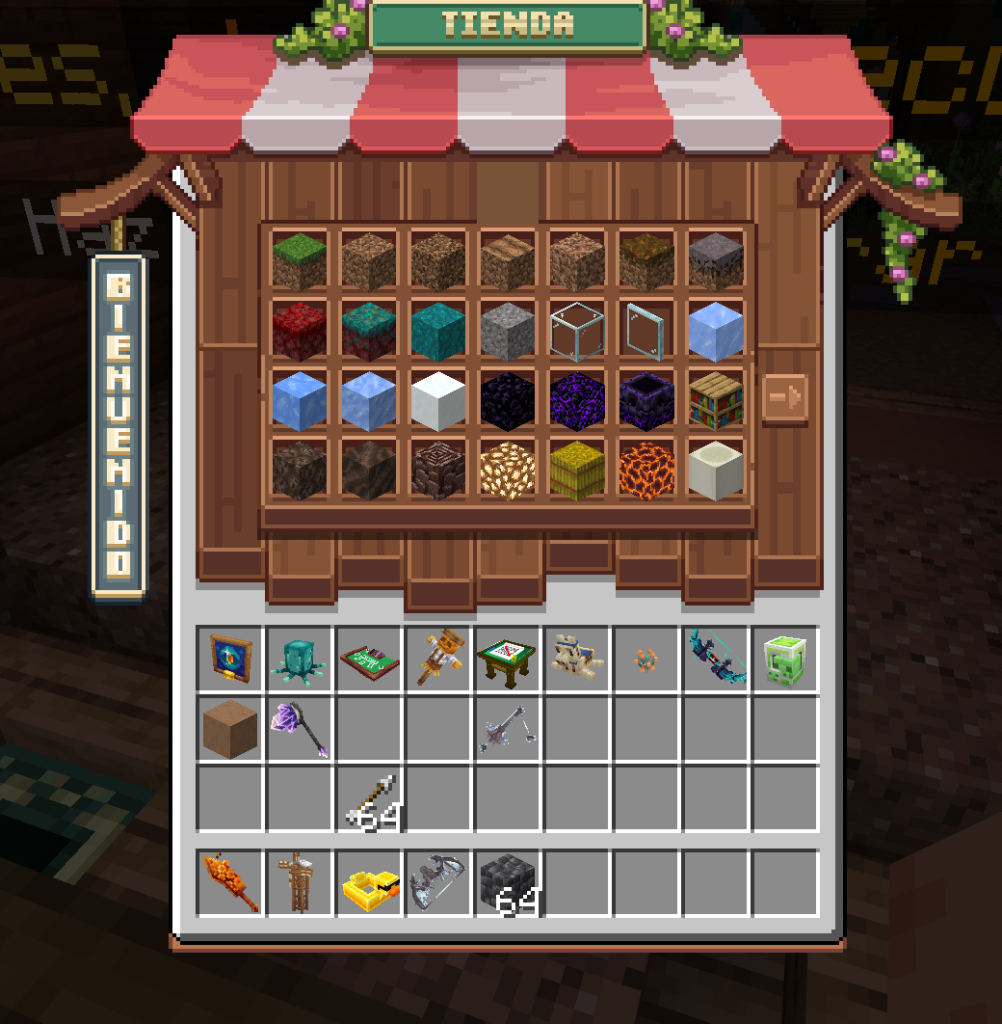
Once, before the first conversion, and again whenever you change a menu:
/bge gui import autoIt reads the menus out of the plugins you have installed; nothing has to be opened in game. Then convert as usual. A DeluxeMenus menu gets its row count from the menu file itself; every other menu is measured from its picture, including one that is a single row of buttons over the player inventory.
Open that menu in game and run:
/bge gui import liveIt measures the menu exactly as the server draws it. Menus that already look right need nothing.
A menu picture with transparent areas stays transparent on Bedrock: with Hide vanilla GUI frame on (the default) the game's own chest frame and slot cells are blanked under your menus, so nothing of the chest shows through the picture. One menu can keep the frame: its own page has a Hidden background switch.
A menu is one background picture. A title that stacks several image glyphs is not drawn as several layers of one screen — the one exception is a title naming two measured menus, drawn one on top of the other when Layered GUI titles is on.
/bge → GUI (the painting). Defaults are fine for most packs.
Every menu that was measured, one book each — green ships in the pack, red is switched off. Click one for its options; shift-click switches it off or on. The lore shows the source, the rows and the offsets.
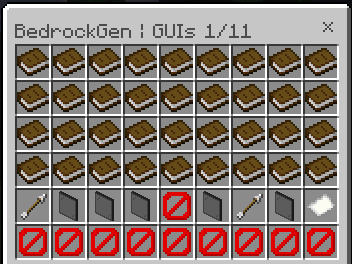
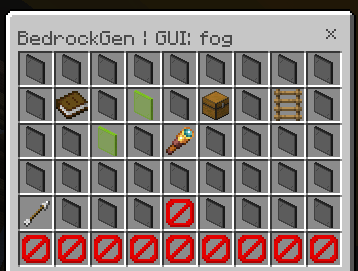
Anything you set here is kept: a later /bge gui import leaves an edited menu alone.
Measured menus show the game's close button above their picture, so Bedrock players can always close them. GUI close button in the panel (gui_close_button) switches it for every menu; a menu's own page has its own Close button: on for this menu, off for this menu, or the server default.
The sidebar on Bedrock: a logo picture as the title (one or several), a transparent background, hidden score numbers — without touching JSON UI by hand.
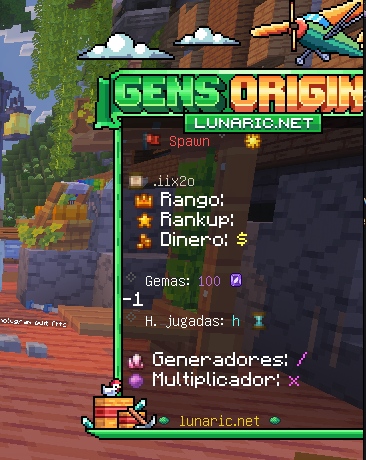
/bge → Scoreboard Settings (the sign).
The logo sizes itself from the glyph the source font declares; a plain-text identifier keeps the built-in size. Changes apply on the next conversion.
A logo typed as a glyph name is looked up in the glyph files at every conversion, and the moves auto-tidy makes in that run are carried into it. When tidy moves the glyph to another character, the sidebar keeps matching — nothing to retype.
/bge scoreboard                      # open the panel
/bge scoreboard logo                 # set the logo PNG (asks for the path in chat)
/bge scoreboard identifier <text>   # :logo:, <glyph:logo>, the character, or plain text
/bge scoreboard identifier add       # add the current pair to the list
/bge scoreboard identifier remove <n>/bge set scoreboard_background_off on — makes the sidebar's black bars fully transparent.
/bge set scoreboard_hide_scores on — keeps player names, hides the numbers beside them.
Each toggle only writes the keys it needs. Leave everything off and the pack ships byte-identical to one without this feature.
The pictures your scoreboard draws behind its lines (panels, cards, logos, several at once) can show on Bedrock too, read by themselves from TAB and other scoreboard plugins. Turn on Backgrounds from the scoreboard in /bge scoreboard, or run /bge set scoreboard_auto_backgrounds on, then convert again. While it is on, logos set by hand are not used.

Bedrock has no native support for custom player-head textures, so Geyser reads
them from its own custom-skulls.json instead of the resource pack. These commands
find a head's texture and register it there.
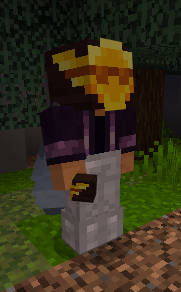
/bge skull live, rendering on
Bedrock./bge skull # register the custom head in your main hand
/bge skull live # start watching: registers every custom head you hold,
# wear, or see in any GUI you open, as you go
/bge skull live stop # stop watching/bge skull live is the one to reach for normally — it needs no GUI open at
a particular moment, unlike registering by hand. Run it once, walk your heads past yourself (hold
them, wear them, open the menus that show them), then /bge skull live stop when
you're done. Already-registered heads are skipped on every pass, so leaving it running costs
nothing.
The file is written to plugins/BedrockGen/output/custom_mappings/custom-skulls.json
— alongside mappings.json, not next to Geyser's own config.yml.
It travels to Geyser with the rest of the output — nothing to copy (see
First install). Existing username / uuid / skin_hash entries
you added by hand are never touched; only the profile list is managed.
Restart Geyser once after a conversion that changed this file; Geyser reads custom skulls at startup.
BedrockGen converts your emojis to Bedrock. Convert the pack and every emoji shows on Bedrock exactly as it does on Java.
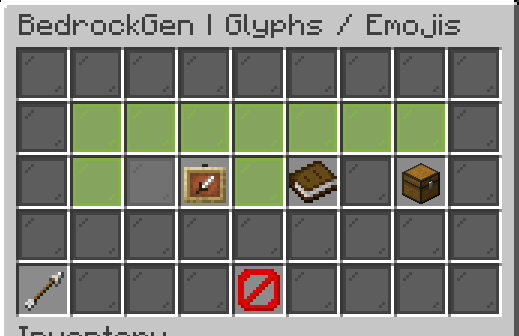
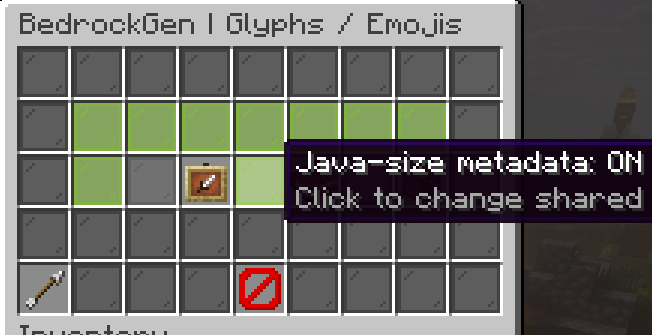
/bge → the book → Glyphs / Emojis. Green = ON, red = OFF, grey = needs the switch it names first. The defaults are right for most packs; you change one only when something looks wrong below.Every switch is also a config key and a command: see the reference page.
ON: your plugin's emojis are converted into the Bedrock pack.
OFF: no emojis on Bedrock at all, and every switch below turns grey.
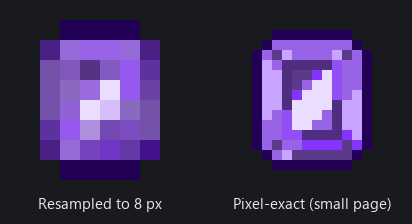
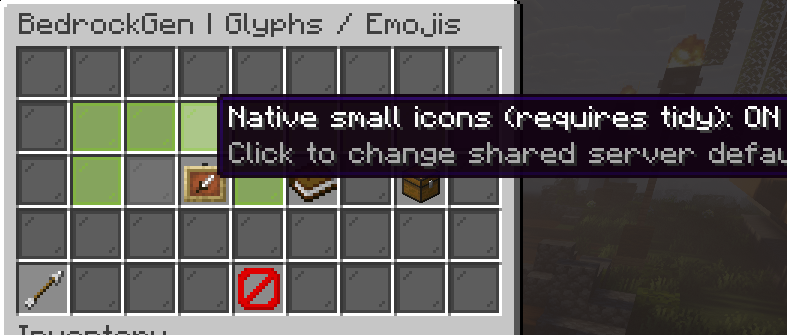
ON: a small icon — drawn for Java at 8 px, on a 16, 32 or 64 px canvas (give or take 4) — ships pixel for pixel on a page of its own size.
OFF: it is resampled to its Java size like every other glyph, and detail goes with the pixels.
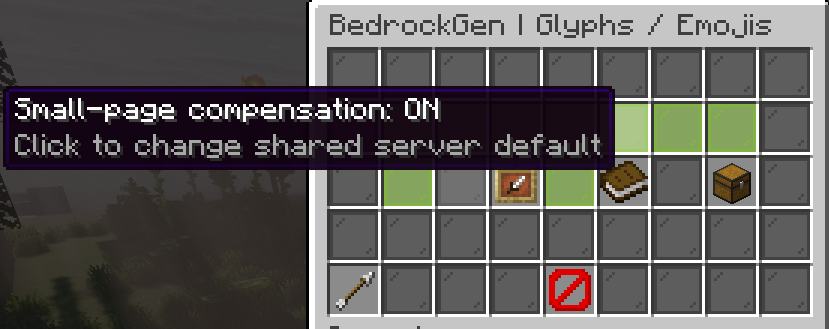
ON: emojis that Bedrock draws at half size are doubled first, so they show at normal size.
OFF: those emojis show at half the size you drew.
Turn it on if: some emojis are exactly half size and Auto tidy is off.
ON: Bedrock's own letters, numbers and punctuation stay intact under your emojis.
OFF: an emoji that lands on a letter page blanks that page's letters in menus and signs.
Turn it on if: leave it on.
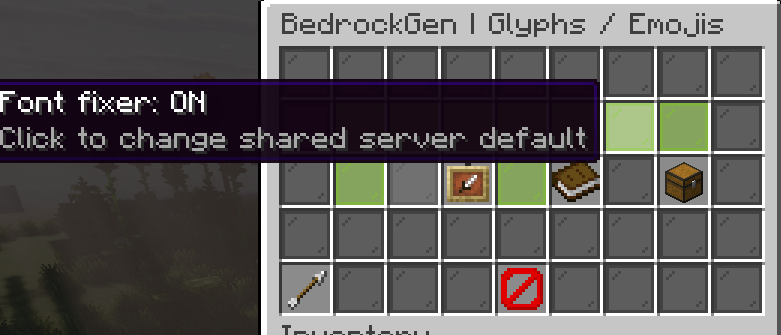
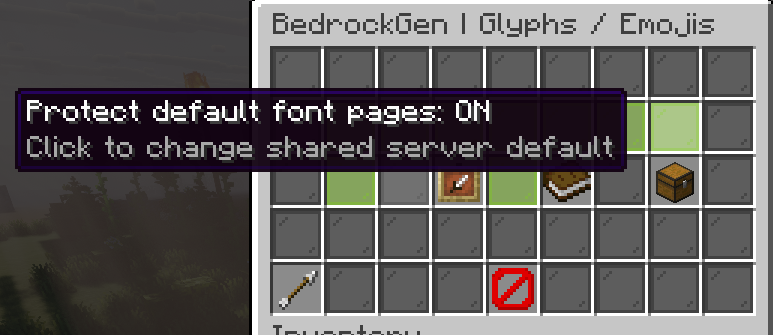
Bedrock draws letters and emojis from font pages of 256 characters each, named by two hex digits (E0, AC, 4E…). Some pages hold a language's letters: AC–D7 Korean, 4E–9F Chinese, 06 Arabic.
ON: no emoji is put on a protected page, so its letters stay right. An emoji that would land there moves to a free page (Auto tidy) or is left out; the console says which.
OFF: emojis may take any page, and that page's letters can come out wrong.
Protected pages (the shield beside it, open while this is on) lists every Bedrock page with what it holds and its language, e.g. AC (Korean KO). Green is protected, red is free for emojis. The 23 default pages are protected: protect more for your players' languages, or free one you need. It takes effect at the next conversion.

Turn it on if: leave it on.
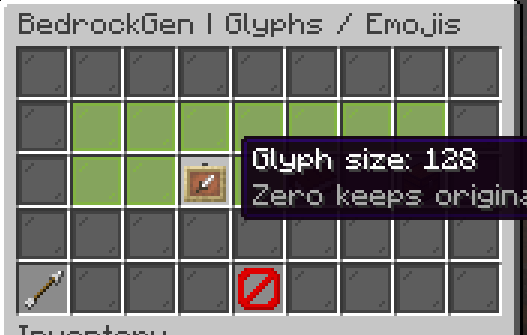
ON: the biggest size any emoji ships at: 8 / 16 / 32 / 64 / 128 / 256, or Original.
Turn it on if: emojis look blurry or pixelated — choose Original, and they ship with exactly the pixels you drew.
ON: an emoji bigger than the Glyph size is left out of the pack.
OFF: it is shrunk to fit and still ships.
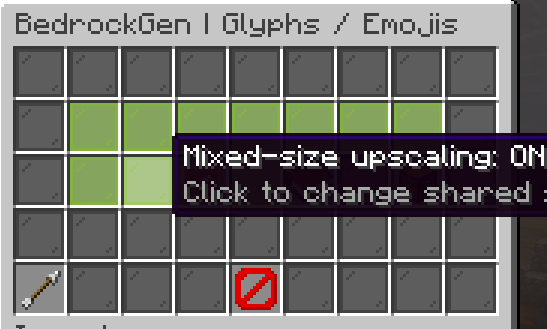
ON: small emojis that share a page with big ones are enlarged to fill their cell.
OFF: they stay small.
Turn it on if: you do not want Auto tidy, but small emojis look tiny next to big ones.
ON: BedrockGen writes each emoji's Java size into glyphs.yml, for review and override.
OFF: nothing is written. Harmless either way.
The emoji shipped at fewer pixels than you drew and was scaled back up.
An emoji landed on one of Bedrock's letter pages.
That symbol sits in a range Bedrock halves before drawing.
They were resampled into a bigger cell.
Everything else — config keys, commands, rarer cases, exact sizes in glyphs.yml, and why Bedrock draws glyphs this way — is on Emojis reference.
The keys behind the switches, the commands, and the fixes for the rare cases.
| Switch | Key | Default | Command |
|---|---|---|---|
| Custom fonts | font | on | /bge set font on|off |
| Auto tidy | font_auto_tidy | on | /bge set font_auto_tidy on|off |
| Native small icons | font_tidy_small_icons | on | /bge set font_tidy_small_icons on|off |
| Small-page compensation | font_small_maxed | off | /bge set font_small_maxed on|off |
| Mixed-size upscaling | font_scale_mixed | off | /bge set font_scale_mixed on|off |
| Glyph size | font_size | 128 | /bge set font_size 0|8|16|32|64|128|256 |
| Drop oversized glyphs | font_size_drop_oversized | off | /bge set font_size_drop_oversized on|off |
| Java-size metadata | font_java_size | on | /bge set font_java_size on|off |
| Font fixer | font_fixer | on | /bge set font_fixer on|off |
| Protect default font pages | font_fixer_protection | on | /bge set font_fixer_protection on|off |
| Protected pages | font_fixer_protectedfont_fixer_unprotected | [] | /bge settings → Glyphs / Emojis → Protected pages |
/bge emojis | The same switches, as chat rows |
/bge glyph <source> | Pending glyph review in the browser: see each emoji at its real Bedrock size before you ship it, fix a size or an offset, Send |
/bge scan scaffolding [folder] | Import your glyph sizes from Scaffolding's glyphs.yml into BedrockGen |
Look at the console from that conversion — it says why. /bge details shows it again, and its Details: line names a file that lists each emoji.
glyph auto-tidy: N glyph(s) skipped - the private-use pages are full means the pack has more emojis than Bedrock has free pages. Those emojis stay where the pack drew them, so they can come out at the wrong size. Take the emojis you do not use out of the pack.
Other reasons it gives: over the Glyph size with Drop oversized on, or on a protected page. If nothing was logged, the player kept a cached pack — rejoin.
One symbol can carry one picture. Change the symbol in one of the two plugins. Auto tidy does not merge them.
Bedrock places emojis with its own baseline. Open /bge glyph <source> and use the offset control.
The name is in the wrong section, or it is the file name instead of the emoji id. See below.
Java rescales a picture as it draws it; Bedrock shows the picture as shipped. Bedrock enlarges cleanly, but a picture made smaller loses pixels, so its quality drops.
HUD images are screens, not emojis. That is the Bedrock UI add-on — Custom HUDs.
/bge glyph <source> opens a page in your browser with every glyph page of the pack. Pick an emoji, move scale or type a height, and as it ships shows the result beside as drawn. Send to the server writes the choice into glyphs.yml; the next conversion uses it.
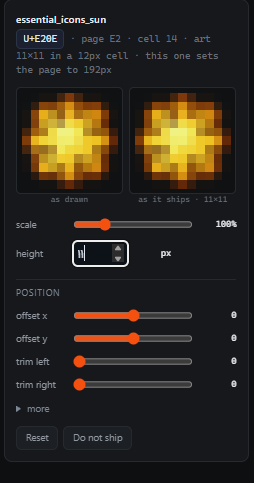
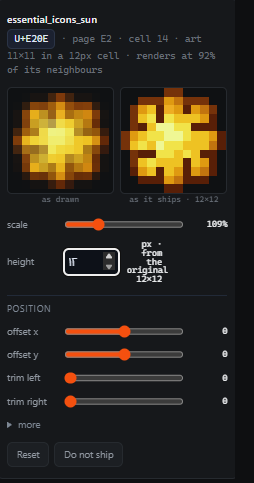
plugins/BedrockGen/glyphs.yml. Two sections: glyphs: takes an emoji id (the key at the top of its block in your plugin's file — not the file name, not the texture path); fonts: takes a font name and applies to every emoji in it. An emoji's own entry wins over its font; height wins over scale.
glyphs:
  god_tag:
    height: 36        # exactly 36 px
  farmer_tag:
    scale: 2.0        # twice its drawn size
  big_logo:
    sample: true      # use the full-resolution image
Two spaces per level, never tabs. Every glyph is listed here at the size it converts at; change a value and it stays — a conversion rewrites only the values you did not touch.
Some models in a pack are referenced without anything saying which vanilla item they're based on. Bedrock has to know that, so BedrockGen stops and asks you, once per pack.
The rest of the pack keeps converting while you decide. You'll see a message in chat with two options:
▮ 3 items need a material  of 12
▮ 9 already set from your saved file

  [ Edit pending ]           opens a review session in your browser
  [ Convert without them ]   those 3 items get no Bedrock mapping
The first option gives you a link. Opening it starts a session that stays valid for two hours: you fill in the item ids in your browser, press send, and the conversion picks up from there by itself. There's no command to run afterwards.
What you answer is stored in
plugins/BedrockGen/materials.yml, and is not asked again
for the same pack. You can write an id either way, paper or
minecraft:paper. Leaving a field blank is a real answer too: it means convert
everything else and skip that one.
If you'd rather never be asked, set skip_pending: true.
Everything below converts today. Two rows need a Geyser extension installed, and the Notes column says which.
| Feature | Status | Notes |
|---|---|---|
| Items, 2D and 3D | Converts | 3D models become held Bedrock models, and their inventory icon is rendered from the model's own display settings. Flat items become sprites. |
| Bows, crossbows, tridents and spears | Converts | The draw, charge and throw poses are rebuilt properly, including the nocked arrow on a crossbow and the trident's charged stance. |
| Custom blocks | Converts | Note block, string, chorus and the other host blocks become real Bedrock blocks with their sounds. Stairs, slabs, doors, trapdoors and cross-shaped plants keep their actual shape instead of turning into full cubes. |
| Ores, crops and 3D geometry | Converts | Custom ores, crops and other plant blocks come across with the model they were built from, and a block that is real 3D geometry rather than a textured cube keeps that geometry on Bedrock. |
| Player armor | Converts | Custom armor that has an equipment texture shows up as worn armor on Bedrock players. |
| MythicArmors 3D armor | Converts | MythicArmors sets are worn as full 3D armor on Bedrock players, helmet to boots, from the same bbmodel. |
| Furniture | Needs extension | Position, scale and offset come from the model's display settings, so a chair you place
ends up sitting where it should. Drawn by BedrockGen-Ex. |
| Glyphs and emotes | Converts | Java bitmap fonts become Bedrock glyph sheets, so your glyphs appear in chat, in names and in menus. |
| Custom sounds | Converts | Remapped so Bedrock players hear them too. |
| Item components | Converts | Food, consumable, tool, repairable and use cooldown are carried across, so a custom food is actually edible on Bedrock rather than just looking the part. |
| Animated textures | Converts | Animation strips are rebuilt as Bedrock flipbooks. |
| ModelEngine and BetterModel | Needs extension | Model bundles are converted and installed for you. Drawn by BedrockGen-Int, on by itself when ModelEngine or BetterModel is installed; pack.model_engine: off in BedrockGen's config leaves them out (see Settings). ModelEngine and BetterModel can run together. |
| Dyeable items and furniture | Converts | Items, armor, cosmetics and furniture you can dye on Java take the same colour on Bedrock, in hand and on the inventory icon: leather armor, horse armor, HMCC cosmetics, Nexo furniture and models where only some parts take the colour. |
| Armor trims | Converts | Trims show on worn armor, on inventory icons and in the smithing table preview, with the game's patterns and materials and a pack's own; trimmed tools too. |
| Text displays and holograms | Needs extension | Java text displays (holograms from FancyHolograms, CMI and any plugin that uses them, nameplate lines above players) are drawn as on Java, with their colours and glyphs. Drawn by BedrockGen-Ex; text-displays in its config (see Settings). |
| Tooltip styles | Converts | An item's own tooltip style (tooltip_style, ItemsAdder's included) draws its frame and background on Bedrock. |
| Scoreboard pictures | Converts | Logos, panels and backgrounds your scoreboard draws, read from TAB and other scoreboard plugins (see Scoreboards). |
| Riding and seats | Needs extension | Riders sit where Java seats them on ModelEngine, BetterModel and MCPets mounts; the seat follows the mount, the mount is controlled as on Java, and shift makes it go down instead of throwing the rider off. TrainCarts trains move on Bedrock. |
| Horse, wolf and llama armor | Converts | Custom horse and wolf armor and llama carpets are drawn and worn on Bedrock. |
| Still furniture as blocks | Needs extension | Furniture that stands still is drawn by the Bedrock client as blocks: far fewer packets and smoother servers. furniture-blocks in BedrockGen-Ex's config. |
| Elytra gliding | Needs extension | Other players gliding on an elytra are drawn gliding, with their wings spread - built into BedrockGen-Ex, nothing to install (see Custom elytras). |
| Cosmetics and backpacks | Needs extension | HMCC backpacks worn on the player show, and balloons and other moving cosmetics follow the player. |
| Block item icons | Converts | An item that places a custom block shows that block as its inventory icon. |
| Data packs | Beta | The items a data pack gives out (loot tables, recipes, trades, its commands) and its biomes convert with its resource pack (see Converting a pack). |
| Data pack mobs (objmc) | Beta | Mobs a data pack builds from objmc models are drawn on Bedrock. Moving display entities glide between their positions, as on Java. |
| Player heads in chat | Converts | The heads ChatHead puts in chat show on Bedrock, as on Java. |
These are the things that don't work yet. Most of them are Bedrock limitations rather than features we haven't got round to, and the Status column says which is which.
| Feature | Status | Notes |
|---|---|---|
| Custom paintings | Not supported | Bedrock players see the vanilla paintings instead. |
These come from the Bedrock client itself. No pack, no plugin and no Geyser change lifts them; they change only when Mojang changes the client.
| Feature | Status | Notes |
|---|---|---|
| Hopper, dropper and dispenser reskins | Not possible | Those screens are built into the Bedrock client, and no resource pack can change them. |
| Item-frame furniture | Not possible | Furniture built on an item frame shows on Bedrock as a flat 2D icon: the Bedrock client cannot draw a 3D model inside an item frame. Furniture built on an item display converts and is drawn in full. |
| Custom fishing rod line | Client limit | The rod converts and the hook is cast and catches, but the Bedrock client draws no fishing line for a custom rod. Nothing in the pack, the plugins or Geyser can add it. |
HUDs from MythicHUD, BetterHud and CustomNameplates are a longer story, and they have their own page.
4 つの質問に答えると、あなたのサーバーに必要な手順だけが出ます。置くファイル、変える設定、実行するコマンド。終えるかスキップするまで、ほかのページは操作できません。
BedrockGen は、コンテンツプラグインがすでに生成している Java 版のリソースパックを、 Bedrock 版のパックと、それに対応する Geyser のマッピングに変換します。これで統合版のプレイヤーにも、 Java 版と同じアイテム・ブロック・防具・家具が表示されます。
Oraxen、ItemsAdder、Nexo、CraftEngine、EcoItems のパックをそのまま読み込むので、コンテンツの 作り方を変える必要はありません。これまでどおり制作を続けて、パックを更新したときに変換するだけです。
まずはじめてのインストールを一度通してから、 パックを変換するに進んでください。 そのあとは、変換のたびにコマンド 2 つだけ。出力は自動で Geyser に届きます。
BedrockGen の購入は、互換性対応・テスト・新しい変換機能の開発に使われます。開発支援、寄付、 パートナーシップについては直接ご連絡ください。
連絡先は 2 か所あり、どちらでも同じサポートを受けられます。すでに参加しているほうを使ってください。
うまく変換できなかったときは、対象のアイテム・ブロック・家具の名前を伝えて、ゲーム内のスクリーンショットも 添えてください。名前がないと、どのモデルのことか推測するしかありません。
3 つのファイル、それぞれ役割は 1 つ。
| ファイル | 動く場所 | 役割 |
|---|---|---|
BedrockGen.jar | Paper | 変換する。 コンテンツプラグインが作るパックを読み、plugins/BedrockGen/output/ に統合版パック一式と Geyser マッピングを書きます。 |
BedrockGen-Int.jar | Paper | 配信し、動かす。 出力を Ex へ送り、サーバーだけが知ること(カスタムエリトラ、バックパック、ブロック破壊速度、ModelEngine / BetterModel のモデル)を担当します。 |
BedrockGen-Ex.jar | Geyser(拡張) | 見せる。 統合版プレイヤーにパックを配り、家具・ディスプレイエンティティ・モデルを描きます。 |
BedrockGen-Int が plugins/BedrockGen-Int/secrets.yml に 1 行 secret: "bgx3:…" を書きます。それを Geyser が動く場所の extensions/bedrockgen_ex/secrets.yml に id1 として貼り付け、/bedrockgenint sync を実行します。あとは変換のたびに
自動で Geyser に届きます。手順を見る →
統合版クライアントはパックをキャッシュします。 変換後も古いパックが見えるなら 1 度再参加。コンソールが Geyser の再起動を求めたら 1 度再起動してください。
ファイルは 3 つ。2 つは Paper サーバーへ、1 つは Geyser が動く場所へ。あとは 1 行をコピーしてつなぐだけ — ポートもアドレスも不要です。
| ファイル | 置き先 | 役割 |
|---|---|---|
BedrockGen.jar | Paper:plugins/ | コンバーター。コンテンツプラグインのパックを読み、統合版のパックを書き出します。 |
BedrockGen-Int.jar | 同じ Paper:plugins/ | ランタイムのサーバー側:出力を Geyser に届ける、カスタムエリトラ、バックパック、ブロック破壊、モデル。 |
extensions/BedrockGen-Ex.jar | Geyser のホスト:その extensions/ | ランタイムの Geyser 側:パックを配り、家具・エンティティ・モデルを統合版プレイヤーに描きます。 |
ライセンスは 3 つで 1 つ。ネットワークでは、変換する各バックエンドに BedrockGen と Int を、Geyser が動く場所に Ex を 1 つ。
足りないものがあれば /bedrockgenint sync が何かを言います。
| 手順 | 場所 | やること |
|---|---|---|
| 1 | Paper | BedrockGen-Int が plugins/BedrockGen-Int/secrets.yml に自分の行を書きます:secret: "bgx3:…" |
| 2 | Geyser | extensions/bedrockgen_ex/secrets.yml に、その値を id1: "bgx3:…" として貼り付けて保存。再起動は不要。 |
| 3 | Paper | /bedrockgenint sync を実行。installed on … と答えます。 |
完了。これからは変換のたびに自動で Geyser に届きます。
同期に失敗すると、枠で囲んだ表示で知らせます:Paper のコンソール(とゲーム内の OP)と Geyser のコンソールに、 理由とやるべきことを 1 つ。直ったときも 1 行で知らせます。
この行はあなたのライセンスでしか使えません。Geyser が複数あるときは同じ行をそれぞれに貼り付けます。
BedrockGen のある Paper サーバーは、それぞれ自分の行を持っています。全部を Geyser の secrets.yml に、
1 つずつ id を付けて入れます:
# extensions/bedrockgen_ex/secrets.yml
secrets:
  id1: "bgx3:…"    # lobby から - 優先
  id2: "bgx3:…"    # survival から
パックは 1 つにまとめられます。2 つが同じものを定義していれば id1 が優先です。どのサーバーで変換や
/bedrockgenint sync をしても、置き換わるのはそのサーバーの分だけで、ほかはそのまま残ります。
行を消したサーバーはまとめから外れます。secret/ の古いファイルは同じ行のまま自動で secrets.yml に移ります。
これはクラウド同期です。直接接続にしたい場合 →
クラウド同期の代わりに使います。両方の config ファイルで sync.mode: direct にします。
そのとき、その下の direct: セクションが使われます。あとは次のとおりです:
Int(Paper 側)がパックを Ex(Geyser の横)へ送ります。必要なのは Ex の場所だけ:
アドレスとポート。自分の構成を探して、その 1 行を
plugins/BedrockGen-Int/config.yml に書きます。
| Geyser の場所 | Int の direct: に書くもの |
|---|---|
| 同じ Paper サーバーの Geyser-Spigot | 何も書かない |
| Paper と同じマシンの Geyser Standalone またはプロキシ | address: "127.0.0.1" |
| Docker の中、または同じネットワークの別マシン | Paper から届くアドレス。例 address: "172.18.0.1" — 公開 IP ではありません |
| インターネット越しの別マシン | その公開 IP。例 address: "203.0.113.10" |
| Geyser が複数 | targets: の下に Geyser ごとに 1 行 — Geyser が複数あるとき を参照 |
port は 2 つのファイルで同じ番号です。例 — Paper と Geyser Standalone が同じマシン:
# Geyser: extensions/bedrockgen_ex/config.yml
direct:
  port: 8801

# Paper: plugins/BedrockGen-Int/config.yml
direct:
  address: "127.0.0.1"
  port: 8801
両方を再起動し、Paper で確認します:
/bedrockgenint sync
sync: 127.0.0.1:8801 - done (213 files, 6.0 MB)
書いたアドレスが、Int の使うアドレスです。unreachable は Paper から
そのアドレスかポートに届かないという意味です:アドレスと、ポートが 2 つのファイルで同じで開いているかを確認してください。
変換する各バックエンドに BedrockGen と Int を、Geyser ごとに Ex を 1 つ。Int の targets
(plugins/BedrockGen-Int/config.yml)で各 Ex に名前を付けると、変換のたびに全部へ送ります。/bedrockgenint sync は全部へ、
/bedrockgenint sync lobby は 1 つへ送り、Geyser ごとに 1 行ずつ答えます。
direct:
  targets:
    lobby:
      address: 10.0.0.2
      port: 8801
    survival:
      address: 10.0.0.3
port: 8801Geyser-Spigot.jar を plugins/ に置きます。
BedrockGen-Ex.jar を plugins/Geyser-Spigot/extensions/ に置きます。
リロードだけでは拡張は読み込まれません。
Int と Ex は同じサーバーにいます。変換のたびに出力はそのまま Geyser に入り、統合版プレイヤーは次の参加で受け取ります。
Geyser-Velocity または Geyser-BungeeCord を使い、その Geyser の extensions/ に BedrockGen-Ex.jar を置きます。
プロキシと BedrockGen を使う各バックエンドに Floodgate を入れ、プロキシ側で send-floodgate-data: true にします。
key.pem を使うプロキシの鍵を各バックエンドの Floodgate フォルダーへコピーします。別々に生成した鍵は使えません。
Ex はプロキシ側の extensions/bedrockgen_ex/config.yml にあるポートで待ち受けます — 空いているポートなら何でも構いません:
direct:
  port: 8801        # 例 - 空いているポートを選び、バックエンドへ開ける
そのポートを BedrockGen を使う各バックエンドから許可してください。接続するのはバックエンドの Int からプロキシへで、逆はありません。各バックエンドの plugins/BedrockGen-Int/config.yml にも同じ番号を書きます:
direct:
port: 8801 # Ex と同じポートバックエンドの plugins/BedrockGen-Int/config.yml に、バックエンドから見たプロキシのアドレス(同じ LAN や Docker ネットワークなら内部アドレスで、公開アドレスではありません)と Ex のポートを書きます:
direct:
  address: "10.0.0.2"   # 例 - Geyser と Ex が動くプロキシのマシン
  port: 8801            # Ex と同じポート
ここに書いたアドレスが、Int が常に使うアドレスです。
Paper サーバーのそのファイル 1 つだけ。他には何もありません。
BedrockGen は変換するバックエンド 1 台にだけ置きます。ほかのバックエンドは Int だけで、同じアドレスとポートを書きます。Ex はプロキシに 1 つだけです。
| マシン | 動くもの | そのファイル |
|---|---|---|
proxy 10.0.0.2 | Velocity + Geyser + BedrockGen-Ex.jar | extensions/bedrockgen_ex/config.yml → port: 8801 |
lobby 10.0.0.11 | Paper + BedrockGen.jar + BedrockGen-Int.jar | plugins/BedrockGen-Int/config.yml → address: "10.0.0.2"、port: 8801 |
survival 10.0.0.12 | Paper + BedrockGen-Int.jar | 同じ address と port |
変換は BedrockGen のあるバックエンドで 1 回だけ。パックは Geyser に届き、Int だけのバックエンドは起動時と /bedrockgenint sync のときに必要なもの(カスタムエリトラのデータ)を Ex から取ってきます。Int に Geyser ホストを複数書いてあれば、出力は聞かれることなく全部に送られます。バックエンドごとに別のパックにするなら、パックごとに Geyser が要ります — 「Geyser が複数あるとき」を見てください。
/bedrockgenint sync上のアドレスとポートでつながっていればこう出ます:
sync: 10.0.0.2:8801 - done (213 files, 6.0 MB)unreachable は、そのバックエンドからポートが開いていないか、アドレスが違うということです。同じアドレスとポートはコンソールからも設定でき、保存されます:
/bedrockgenint delivery use 10.0.0.2:8801Geyser Standalone は Paper プラグインではなく、別に起動するプログラムです。
BedrockGen-Ex.jar を Standalone フォルダー内の extensions/ に置きます。
config.yml に Paper のアドレスとポートを設定します。Floodgate を使う場合は Paper に Floodgate を入れ、auth-type: floodgate にして、Paper の key.pem を Standalone jar の横へコピーします。
Ex は Standalone の横の extensions/bedrockgen_ex/config.yml にあるポートで待ち受けます — 空いているポートなら何でも構いません。Paper サーバーから許可し、Paper 側の plugins/BedrockGen-Int/config.yml にも同じ番号を書きます:
direct:
  port: 8801        # 例 - 両方のファイルで同じ番号
Standalone が Paper と同じマシンなら何も開ける必要はありません。
Paper の plugins/BedrockGen-Int/config.yml に、Paper から見た Standalone のマシンのアドレス(同じマシンなら 127.0.0.1)と Ex のポートを書きます:
direct:
  address: "10.0.0.5"   # 例 - Geyser Standalone と Ex が動くマシン
  port: 8801            # Ex と同じポート
ここに書いたアドレスが、Int が常に使うアドレスです。
Paper サーバーのそのファイル 1 つだけ。他には何もありません。
Standalone はプロキシの前に立ちます。BedrockGen は変換するバックエンド 1 台にだけ置き、ほかのバックエンドは Int だけで、同じアドレスとポートを書きます。Ex は Standalone の横に 1 つだけです。
| マシン | 動くもの | そのファイル |
|---|---|---|
geyser 10.0.0.5 | Geyser Standalone + BedrockGen-Ex.jar | extensions/bedrockgen_ex/config.yml → port: 8801 |
lobby 10.0.0.11 | Paper + BedrockGen.jar + BedrockGen-Int.jar | plugins/BedrockGen-Int/config.yml → address: "10.0.0.5"、port: 8801 |
survival 10.0.0.12 | Paper + BedrockGen-Int.jar | 同じ address と port |
変換は BedrockGen のあるバックエンドで 1 回だけ。パックは Geyser に届き、Int だけのバックエンドは起動時と /bedrockgenint sync のときに必要なもの(カスタムエリトラのデータ)を Ex から取ってきます。Int に Geyser ホストを複数書いてあれば、出力は聞かれることなく全部に送られます。バックエンドごとに別のパックにするなら、パックごとに Geyser が要ります — 「Geyser が複数あるとき」を見てください。
/bedrockgenint sync上のアドレスとポートでつながっていればこう出ます:
sync: 10.0.0.5:8801 - done (213 files, 6.0 MB)unreachable は、Paper からポートが開いていないか、アドレスが違うということです。同じアドレスとポートはコンソールからも設定でき、保存されます:
/bedrockgenint delivery use 10.0.0.5:8801| コマンド(Paper 側) | 働き |
|---|---|
/bedrockgenint sync | 今のパックをすぐ送り、1 行で答えます:done (… files, … MB) - installed on lobby / unchanged / nothing to send, convert first。直接リンクでは、アドレスと、応答が無いときの unreachable。 |
/bedrockgenint delivery use <ip[:port]> | Int が自力で Geyser を見つけられなかったときに、場所を一度だけ教えます。 |
/bedrockgenint sync <name|all> | targets に Geyser が複数あるとき:名前の 1 つへ、または all で全部へ送ります。 |
3 つのファイルを新しいものに置き換え、古いファイルは削除してください —
新しいファイルの横に残さないこと(例:BedrockGen.jar の横の BedrockGen-1.0.300.jar)。
サーバーが古いほうを読み込むことがあります。残っていれば、起動時にコンソールがそのファイルを名指しします:
2 copies of BedrockGen are in plugins/: BedrockGen-1.0.300.jar (1.0.300), BedrockGen.jar (1.0.326)
- this server runs 1.0.326. Keep only the newest: delete the others and restart, ...
名指しされたファイルを削除して再起動します。同じ確認が BedrockGen-Int と、Geyser の
extensions/ の BedrockGen-Ex にもあります。
1.3.19 からは、最初の起動で各プラグインのファイルが新しい場所に並びます — 自分で編集するファイルは見える場所に残り、
自動で作られるものはすべて cache/ に移ります — 古い secret ファイルも同じ行のまま secrets.yml に移ります。
設定したものは何も失われません。以前のバージョンでサーバーの内容が消えていたら、そのサーバーで一度
/bedrockgenint sync を実行してください。
インストールはこれで全部です。変換後に手でコピーするものはありません:Int が出力を Ex へ送り、 統合版プレイヤーは次の参加で受け取ります。
初回だけ元のパックを準備し、以後は変更のたびに 2 つの変換コマンドを実行します。
Oraxen、ItemsAdder、Nexo、CraftEngine、EcoItems は、生成したパックを難読化したりロックしたりできます。その保護は BedrockGen からの読み取りも止めてしまうので、変換前に無効にしてください。使っているプラグインを 選んでください。単体のリソースパックは リソースパック、データパックのアイテムは データパック を。
plugins/Oraxen/settings.yml で次のようにします。
Pack:
  generation:
    obfuscation:
      type: NONE
    protection: false
そのあとリロードします。
/oraxen reload all新しい ItemsAdder(ベータ版)では、パックの保護が plugins/ItemsAdder/config.yml の
resource_pack.obfuscation にあります。4 つとも切ってください。
resource_pack:
  obfuscation:
    zip_entries: false
    zip_archive: false
    png: false
    short_texture_references: false
同じファイルに古い設定が残っていることがあり、それも効きます。zip の保護を切ります。
zip:
  protect-file-from-unzip:
    protection_1: false
    protection_2: false
    protection_3: false
    short_texture_references: false
パックの難読化も切ります。
resource-pack:
  protect-pack: false
  obfuscation:
    enabled: false
カスタム防具を使っている場合は、レガシー CIT も有効にしてください。これが有効なときだけ ItemsAdder は 防具テクスチャを書き出すので、無効のままでは変換する元データがありません。
zip:
  custom_armors_shaders_legacy:
    optifine:
      generate_cit:
        1_20_4_lower: true
ItemsAdder のベータ版では、同じ設定は次の書き方です。
resource_pack:
  custom_armors_shaders_legacy:
    generate_optifine_cit_1_20_4_lower: true
そのあと再生成します。
/iareload
/iazip
plugins/Nexo/settings.yml で次のようにします。
OBFUSCATION: NONEそのあとリロードします。
/nexo reload allCraftEngine は保護のかかっていないコピーをもう 1 つ書き出せます。BedrockGen が読むのはそちらです。
plugins/CraftEngine/config.yml で次のようにします。
protection:
  unprotected-copy:
    enable: true
    path: "./generated/resource_pack_unprotected.zip"
パックを生成し直してから、そのファイルを変換します。
/bge convert --input=./generated/resource_pack_unprotected.zipそれでもコピーが書き出されない場合は、保護機能もまとめて無効にしてください。
protection:
  crash-tools:
    method-1: false
    method-2: false
    method-3: false
    method-4: false
    method-5: false
    method-6: false
    method-7: false
    method-8: false
  incorrect-crc: false
  fake-file-size: false
  escape-json: false
  fake-directory: false
  break-texture: false
plugins/EcoItems/pack.yml で次のようにします。
obfuscation: falseそのあとリロードします。
/ecoitems reloadプラグインを使わない単体のリソースパックです。zip(またはフォルダ)を
plugins/BedrockGen/resource/ に置き、名前を指定して変換します。
/bge convert resource pack.zipプラグインのパックと一緒に変換するときは、両方を指定します。プラグイン 1 つとパック 1 つまでです。
/bge convert resource nexo pack.zipどちらが優先か:先に書いたほうです。同じアイテム・モデル・テクスチャが両方にあれば先のほうが使われ、
それ以外は両方とも残ります。パックを上にするには順番を入れ替えます:/bge convert resource pack.zip nexo。
プラグインを指定すると、/bge convert nexo と同じくそのアイテム・絵文字・メニューも読み込まれます。
名前は Tab で補完できます。
プラグインがないとき、各アイテムは何? 単体のパックには絵とモデルしかなく、それぞれがどの Java アイテム (紙、剣、ヘルメット…)に載っているかは書かれていません。統合版にはそれが必要です。BedrockGen はサーバーのアイテムプラグイン (MythicMobs、MMOItems、ExecutableItems…)とデータパックに聞き、誰も答えないものは変換の前に質問します。 ゲームそのものから答えるには、学習をオンにします。
/bge learn onプレイヤーが遊んでいる間、BedrockGen は各カスタムアイテムの正体を覚えます:載っているアイテム、名前、装備スロット、
ツールチップスタイル。手に持つもの、着ているもの、メニューで開くもの、近くのディスプレイ・額縁・落ちたアイテム・モブで
見えるものから読み取ります。再起動してもオンのままです。ワールドは何も変わらず、どこにも送られません:
plugins/BedrockGen/cache/learned-items.json に保存され、次の変換で使われます。/bge learn で覚えた数、
/bge learn off で停止、/bge learn clear で忘れます。
ベータ
データパックが配るアイテム(ルートテーブル、レシピ、取引、コマンドから)を変換し、バイオームも変換します。
world/datapacks/(zip でもフォルダでも)。
ネットワークの別のサーバーで動いている場合は、ここの plugins/BedrockGen/datapacks/ にコピーします。plugins/BedrockGen/resource/ に置き、リソースパック と同じように変換します。/bge convert resource pack.zip新しいアイテムが登録されたと結果に出たら、Geyser を 1 度再起動します。まだ変換されないもの: シェーダーで描くモデルと、ゲーム中にコマンドが選ぶ見た目。
/bge と入力します。以下はそのパネルで、各画像の番号は横のリストに対応します。下のコマンドの方法も同じことをします。
/bge gui import auto変換の前に実行してください。入っているアイテムプラグインすべてから カスタムチェストメニューを読み取り、その結果を変換が使います。実行せずに変換すると メニューはパックに入りません。カスタムメニューがない場合だけ飛ばしてください。 何を読み取り、なぜ必要なのかはチェスト GUI で説明しています。
プラグインを自分で指定することもできます(
/bge gui import auto oraxen,itemsadder)が、省略すればすべてが対象になります。
/bge convertチャットにパネルが開きます。パックを生成したプラグインを選んで「Convert now」を押すだけです。ほかの項目は、多くのサーバーに合う値であらかじめ設定されています。変えたい場合だけChange settings にすべて入っており、そこで選んだ内容は保存されるので、次回もこのコマンド 1 つで変換できます。
完了すると、書き出し先のフォルダーがチャットに表示され、Int はすでにそれを Geyser へ送っています — コピーするものはありません。
二つの部分があります。パックがリテクスチャしたゲーム本来の HUD はパックと一緒に変換されます。 HUD プラグイン — BetterHud、MythicHUD、CustomNameplates、LuxDialogues、Tooltips、CustomFishing など、 フォントで描かれる HUD — は、アドオン BGHud が Bedrock に描きます。
リソースパックがバニラ HUD に加えた変更は BedrockGen 自身が変換します:ホットバーと選択枠、防具・体力・空気・満腹度のバー、 経験値バー、効果の枠、ロケーターバー。パックがリテクスチャしたものだけで、残りは Bedrock が描くままです。
HUD プラグインは、フォントの画像を詰めたボスバー・アクションバー・タイトルで描きます。BGHud は統合版プレイヤー向けに 各フレームを Java と同じように配置し、すべての画像と文字を同じ位置・同じ大きさで表示します。Java のプレイヤーには何もしません。
plugins/ から BedrockGenUi.jar を削除します。これがある間、
BGHud はオフのままです。plugins/BedrockGenUi/ フォルダは残してください — BGHud はそこからサーバーの
識別情報を受け継ぐので、ライセンスは同じサーバーとして数えます。BGHud.jar を plugins/ に置いて再起動。ライセンスはダウンロードに入っています。
コンソールに BGHud customer startup authorized と出ます。BGHud はサーバーの起動時、HUD のビルドごと、そしてサーバーごとに 1 分に 1 回ライセンスを確認します — プレイヤーごとではありません。novaic.net に約 5 分つながらないと統合版の HUD は一時停止し(サーバーは動き続けます)、 つながれば自動で戻ります。1 つのライセンスで同時に 4 台まで。
購入した場所からもう一度ダウンロードし、BGHud.jar を置き換えて再起動します。plugins/BGHud/
フォルダは残してください:サーバーの識別情報が入っているので、ライセンスは同じサーバーとして数えます。更新後の最初の起動で
HUD を 1 回ビルドし直すことがあります。そのビルドが成功するまで、今の HUD パックはそのまま残ります。
コンソールに理由が 1 行で出ます。Paper は動き続けます:
BGHud not started [BGH-段階/理由]、そのあとに対処が続きます。段階はどこで止まったかを示します。
| 段階 | 原因 | 対処 |
|---|---|---|
download-stamp | jar にライセンスが入っていません。 | 購入した場所から自分用のコピーをダウンロードしてください — どのダウンロードにもあなたのキーが入っています。 |
activationruntime-seatstartup | novaic.net でライセンスを確認できませんでした。 | サーバーが novaic.net につながるか確認してください。HTTP-429:このライセンスですでに 4 台が動いています — 1 台止めるか、クラッシュ後なら最大 5 分待ちます。HTTP-403:その行を私たちに送ってください。 |
identity | plugins/BGHud/ に保存されたサーバーの識別情報を読めません。 | フォルダのファイル権限を確認してください。中のファイルは削除しないでください。 |
distributionruntime-unsealruntime-link | jar が壊れています。 | もう一度ダウンロードしてください。 |
runtime-enable | このサーバーで HUD を起動できませんでした。 | 対応する Paper(1.21 以降)と最新の PacketEvents を使ってください。 |
BGHud 4.0.0 は一部の Linux ホストやコンテナで、この行を出さずにオフのままになることがありました:4.0.2 以降に更新してください。
どちらのプラグインも初期設定では統合版プレイヤーが無効で、そのままでは統合版プレイヤーに HUD を送らないため、 BGHud が描くものがありません。一度だけ次のように設定して再起動します。
| プラグイン | ファイル | 設定 |
|---|---|---|
| BetterHud | plugins/BetterHud/config.yml | disable-to-bedrock-player: false |
| MythicHUD | plugins/MythicHUD/config.yml | disable-geyser-players: false |
off ではなく false と書いてください。BetterHud は
off を false として読みません。
pack-hud.mcpack として Geyser へ送ります。変換は
HUD (BGUI-X): carried beside the pack as pack-hud.mcpack (… MB) と表示します。/bge の星
BGUI-X HUD: ON(または /bge set ui_bguix off)でオフにすると、BGHud が自分でこのサーバーの
Geyser にパックを置きます。/bghud build。新しいパックは自動で Geyser に届き、統合版プレイヤーは
次に入ったときに受け取ります。変わっていない HUD はパックもそのままなので、誰も再ダウンロードしません。パックは自動で見つけます:各 HUD プラグイン自身のパックと、ItemsAdder・Nexo・Oraxen・CraftEngine が Java プレイヤーに 送るパック。その場で読むだけで、編集はしません。
| コマンド | 内容 |
|---|---|
/bghud | 状態:読み込んだフォントと画像、描いている統合版プレイヤー、送ったフレーム。 |
/bghud build | HUD のパックを作り直します。何も変わっていなければ kept と言います。 |
/bghud reload | config.yml とパックを読み直します。 |
/bghud tints on|off | プレイ中に、どのプラグインのファイルにもない画像の色を覚えます。次のビルドで使われます。 |
plugins/BGHud/config.yml
| キー | 初期値 | 内容 |
|---|---|---|
take.bossbartake.actionbartake.title | true | BGHud が統合版プレイヤー向けに描くもの。false にするとそれは Geyser のままです。 |
packs | [] | 追加で読む Java パック。HUD プラグインのパックとまとめられたパックは自動で見つかります。 |
learn-tints | false | /bghud tints と同じスイッチ。 |
pack-outputs | 初回起動時に設定 | BedrockGen が運ばないときのパックのコピー先:このサーバーで Geyser が動いていれば Geyser-Spigot/packs。 |
import-identity-from | BedrockGenUi | そのフォルダから旧 HUD アドオンのサーバー識別情報を受け継ぎます(ファイルは変更しません)。空 = 新しい識別情報。 |
カスタムエリトラは統合版プレイヤーに自分の翼で表示され、滑空します。
設定は不要。パックを変換すれば動きます。スイッチは plugins/BedrockGen/config.yml の items.elytra、既定でオンです。
エリトラで滑空する他のプレイヤーも、翼を広げた滑空の姿で描かれます。BedrockGen-Ex に組み込まれているので、インストールするものはありません。
Java 版のタブリスト、正確な HEX カラー、Java 版のチャット、プレイヤーの頭を統合版プレイヤーに。それぞれ個別のスイッチで、BedrockGen-Ex が行います。
/bge settings → Geyser enhancements を開き、スイッチをクリックします。または plugins/BedrockGen/config.yml で設定します:
geyser_enhancements:
  tab: false
  hex: false
  hex_holograms: false
  chat: false
  faces: real
  head_items: true
biomes: truereal:各プレイヤー自身の顔、steve:すべての頭を Steve の顔に(最も軽い)。HEX にはグリフが必要です。正確な色はグリフとして、絵文字が使わずに残したグリフページに描かれます。 ホログラムでは色ごとに 1 つずつ使うので、hex_holograms はずっと多く必要です。足りないときは絵文字が優先です。 そのうえで HEX はスコアボードとネームタグ、次にタブ、最後にホログラムの順に色を確保し、入りきらない分は統合版の近い色で表示されます。
変更は BedrockGen が自動で Geyser に送ります。プレイヤーには次の参加時に反映されます。
正確な色はグリフで描かれ、グリフページはまず絵文字に使われます。絵文字がページを埋めると入る色が減ります:スコアボードとネームタグが最優先、次にタブ、次にホログラムで、残りは統合版の近い色になります。初めて出た色は、そのプレイヤーの次の参加から正確になります。
HEX は色付きのテキストをグリフに変えて登録します。スコアボード・タブ・ホログラム・ネームタグは表示するテキストが決まっているので、色が収まります。チャットは行ごとに新しいテキストとあらゆる色が来るので、その文字と色のためにずっと多くのグリフページが必要になります。そのためチャットは統合版の近い色のままです。
<head:Name>(例 <head:Notch>)でプレイヤーの顔を入れられます。チャット、スコアボード、ホログラム、タイトル、アクションバー、メニュータイトル、Lore。
すべてゲーム内のパネルで設定します:/bge で開きます。緑は ON、赤は OFF、クリックで切り替え。変更は記憶されます。
各行は /bge set で使う名前と、その下に config.yml でのキーを示します(設定は general、delivery、pack、
items、gui、fonts などのセクションに分かれています)。名前が 1 つだけの行は config.yml でのみ設定します。
パネルには同じ値がボタンとして出ます。必要なのは最初のグループだけで、残りは特定のものがおかしいときのためです。
| 設定 | 既定 | 内容 |
|---|---|---|
items.skip_pending | false | マテリアル不明のアイテムがあっても変換する(そのアイテムは除外、質問しない)。 |
icon_sizepack.icon_size | 128 | 3D モデルのインベントリアイコンの大きさ:16、32、64、128。 |
transparencypack.transparency | true | 半透明・発光テクスチャをそのまま保つ。 |
mapping_modepack.mapping_mode | auto | Geyser のアイテム行の書き方:auto、legacy(custom-model-data)、definitions(1.21.4 item-model)。auto はパックから判定。 |
vanilla_assetsitems.vanilla_assets | false | ゲーム標準ブロック・アイテム用のパック独自の絵(リテクスチャ)も運ぶ。オフ=カスタム内容のみ。 |
vanilla_blocksitems.vanilla_blocks | true | vanilla_assets と併用:パックがモデルを置き換えた標準ブロックを、ワールドでもそのモデルで描く。 |
pack_splitpack.split_mb | 7 | パックをこの MB 前後の .mcpack に分割し、標準アセットは別ファイルに。0=1 ファイル。 |
model_enginepack.model_engine | auto | ModelEngine / BetterModel のバンドル。どちらかが入っていれば自動でオン。 |
skip_unused_modelspack.skip_unused_models | true | どのアイテムも使っていないモデルを入れない。パックが軽くなり、プレイヤーの読み込みが速くなります。 |
| 設定 | 既定 | 内容 |
|---|---|---|
gui_skipgui.skip | false | 計測したチェスト画面をパックに入れない。 |
gui_hiddengui.hidden | false | 計測した GUI の下にあるゲーム標準の枠とスロットを消す。 |
gui_layersgui.layers | true | 2 つの計測 GUI を指すタイトルは両方を描き、後のものを上に。 |
gui_pocket_vanillagui.pocket_vanilla | false | タッチ操作のプレイヤーには計測画面ではなく素のチェスト画面を出す。 |
gui_close_buttongui.close_button | true | 計測済みのメニューで、ゲームの閉じるボタンを画像の上に表示。メニュー一つだけならパネルのそのメニューのページで。 |
| 設定 | 既定 | 内容 |
|---|---|---|
fontfonts.enabled | true | パックのフォントを統合版のグリフページへ変換。 |
font_sizefonts.max_size | 128 | 許可する最大グリフ:0=すべてそのまま、または 8 … 256。 |
font_size_drop_oversizedfonts.drop_oversized | false | 超えたグリフ:false=縮小、true=除外。 |
font_fixerfonts.fixer.enabled | true | 標準フォントを正しく描けないクライアントのため、統合版自身のフォントを下に同梱。 |
font_fixer_protectionfonts.fixer.protection | true | fixer のページを、上書きやサイズ変更をするカスタムグリフから守る。 |
fonts.fixer.protectedfonts.fixer.unprotected | [] | 既定の 23 ページに加えて保護する、または解放するページ(2 桁の 16 進数、例 [AC, AD])。Protected pages で選べます。 |
font_auto_tidyfonts.tidy.enabled | true | 統合版のページへ絵文字を大きさごとに並べ、大きな絵文字がページ全体を拡大しないようにする。統合版だけ:プラグインのファイルはそのまま。 |
font_tidy_small_iconsfonts.tidy.small_icons | true | auto-tidy 時:16/32 px のアイコンは再サンプリングなしで移す。 |
font_java_sizefonts.java_size | true | 各グリフの Java サイズを glyphs.yml に書き出し、確認・上書きできるように。 |
font_small_maxedfonts.small_maxed | false | 統合版が半分の大きさで描いてしまうグリフ(CJK など)を 2 倍に。 |
font_small_pages_nativefonts.small_pages.native | true | 小さいページ A0〜A9(A7 を除く)のグリフは、自動整理の有無にかかわらず元のピクセルのまま。 |
font_small_pages_mixedfonts.small_pages.mixed | true | 小さいページで、小さめのグリフを同じページの他のグリフの大きさにそろえる。 |
font_small_pages_guardfonts.small_pages.guard | true | 小さいページで 64px を超えるグリフは入れない。 |
| 設定 | 既定 | 内容 |
|---|---|---|
auto_deliverdelivery.auto | true | 変換のたびに output/ のコピーを Geyser へ自動送信。オフ=output/ のみ。 |
delivery.mode | auto | auto、folder、local、external:コピーの送り先。auto=このサーバーの Geyser、なければ Int 経由で配信。 |
texture_atlaspack.texture_atlas | false | 3D アイテムのテクスチャを 512×512 シートにまとめる。 |
pack.archives | false | __brarchive アーカイブ:新しいクライアントでは読み込みが速いが、Android で固まった例あり。オフのまま推奨。 |
actions_and_stuffitems.actions_and_stuff | false | Actions & Stuff を使うプレイヤーには、アイテムがそのリグに従う。 |
Geyser のホストの extensions/bedrockgen_ex/config.yml にあります。変更後は Geyser を再起動してください。
| 設定 | 初期値 | 内容 |
|---|---|---|
text-displays.enabled | true | Java のテキストディスプレイ(ホログラム、ランキング)を Java と同じように描く。false:Geyser の名札のまま。 |
text-displays.hidden-from-behind | true | 後ろから見たテキストは Java と同じく何も表示しない。false:裏側が表示されます(文字は反転)。 |
text-displays.changing-as-nametag | true | 変わり続けるテキスト(ランキングなど)はクライアントの名札として描く。文字ごとではなく一回の描画で済みます。 |
text-displays.bake-geometries | 256 | 動かないテキストを丸ごと描くためのジオメトリ数の上限(多いほど参加時のクライアントのメモリが増えます)。0 = なし。 |
furniture-blocks | true | 動かない家具をブロックとして描く(ポーズは初めて見たときに覚え、次回の起動からブロックになります)。false:常にエンティティ。 |
/bge settings                     # 同じ設定をチャットの行として
/bge set <設定> <値>              # 例:/bge set font_auto_tidy on
/bge set font_auto_tidy off       # 次の変換から Auto tidy を止める。on で戻す
値は on / off、数値、または上の表にある語のいずれかです。/bge set はゲーム内でもサーバーコンソールでも使え、
設定 = 値 と答えます。変更は次の変換から効き、再起動は要りません。クリックできるパネル(/bge settings、/bge glyphs、
/bge scoreboard)はプレイヤー向けのチャット画面で、コンソールから打つと同じことをするコンソールコマンドを教えます。
/bge| コマンド | 内容 |
|---|---|
/bge convert | パネルを開く:ソースプラグインと設定を選んで変換 |
/bge convert nexo | oraxen | itemsadder | craftengine | ecoitems | そのプラグインのパックを直接変換 |
/bge convert --input=<file> | 指定したパック zip を変換 |
/bge status | 実行中の変換の進み具合 |
/bge cancel | 中止 |
/bge details | 前回の変換レポートをもう一度 |
/bge pending | マテリアル待ちのアイテムと、回答用リンク |
| コマンド | 内容 |
|---|---|
/bge settings | すべての設定をクリックできる行で |
/bge set <設定> <値> | コンソールでもゲーム内でも 1 つ変更。例:/bge set vanilla_assets on。設定 = 値 と答えます |
/bge reload | 設定を再読み込み |
| コマンド | 内容 |
|---|---|
/bge gui import auto <plugins> | 指定したプラグインのチェスト GUI を読む |
/bge gui import live | メニューを開いて計測 |
/bge gui list / remove <id> | 計測メニューの一覧・削除 |
/bge glyphs | グリフパネル:変換されたものと各スイッチ |
/bge learn on|off|clear | プレイヤーが持つ・着る・見るものからカスタムアイテムの正体を覚え、プラグインなしで変換するパックに使う |
/bge scan scaffolding [folder] | Scaffolding の glyphs.yml からグリフサイズを自分の設定へ取り込む |
/bge scoreboard | スコアボードのロゴ・背景・スコア表示 |
/bge skull | カスタム頭テクスチャ |
/bedrockgenint(Paper)| コマンド | 内容 |
|---|---|
/bedrockgenint sync | 今の output/ をすぐ Geyser へ送り、インストールした Geyser の名前を言います。BedrockGen の無いバックエンドはエリトラのデータを受け取ります。足りないもの(secret の行、ライセンス)があれば何かを言い、何も送りません。 |
/bedrockgenint reload | BedrockGen-Int/config.yml を再読み込み |
カスタムのチェストメニューを、Java と同じ描き方で Bedrock に。
最初の変換の前に一度、メニューを変えるたびにもう一度:
/bge gui import auto導入済みプラグインからメニューを読み取ります。ゲーム内で開く必要はありません。あとは通常どおり変換。 DeluxeMenus のメニューは行数をメニューファイルから読み、それ以外は画像から計測します (プレイヤーインベントリの上に一行のボタンだけ、というメニューも含めて)。
そのメニューをゲーム内で開いて:
/bge gui import liveサーバーが描いたとおりに正確に計測します。既に正しいメニューには何も要りません。
透明な部分のあるメニュー画像は Bedrock でも透明のままです。Hide vanilla GUI frame が ON(既定)なら、 ゲーム本来のチェスト枠とスロットがメニューの下で消され、画像越しにチェストが見えることはありません。 一つのメニューだけ枠を残したい場合は、そのメニュー自身のページにある Hidden background で切り替えます。
メニューは背景画像一枚です。タイトルに複数の画像グリフを重ねても、一画面の複数レイヤーとしては描かれません。 唯一の例外は計測済みの二つのメニューを一つのタイトルで名指しする場合で、Layered GUI titles が ON なら重ねて描かれます。
/bge → GUI(絵画)。ほとんどのパックは既定のままで十分です。
計測された全メニューが本一冊ずつ — 緑はパックに入る、赤は OFF。クリックで設定、Shift クリックで ON/OFF。 説明文にソース、行数、オフセットが出ます。
ここで設定したものは保持され、後の /bge gui import は編集済みメニューに触れません。
計測済みのメニューには、ゲームの閉じるボタンが画像の上に表示されるので、Bedrock のプレイヤーはいつでも閉じられます。パネルの GUI close button(gui_close_button)ですべてのメニューを切り替えられ、メニューごとのページにある Close button では、そのメニューだけオン、オフ、またはサーバーの初期設定に従う、を選べます。
Bedrock のサイドバー:タイトルとしてのロゴ画像(一つでも複数でも)、透明な背景、スコア数字の非表示 — JSON UI を手で触らずに。
/bge → Scoreboard Settings(看板)。
ロゴの大きさはソースのフォントが宣言するグリフから決まり、文字列の識別子なら組み込みの大きさです。変更は次の変換で反映されます。
グリフ名で入力したロゴは変換のたびにグリフファイルで引き直され、その回の Auto tidy の移動も反映されます。 tidy がグリフを別の文字へ動かしてもサイドバーは一致し続け、入力し直す必要はありません。
/bge scoreboard                      # パネルを開く
/bge scoreboard logo                 # ロゴ PNG を設定(パスをチャットで)
/bge scoreboard identifier <text>   # :logo:、<glyph:logo>、文字、または文字列
/bge scoreboard identifier add       # 現在の組を一覧に追加
/bge scoreboard identifier remove <n>/bge set scoreboard_background_off on — サイドバーの黒い帯を完全に透明にします。
/bge set scoreboard_hide_scores on — 名前は残し、横の数字を隠します。
各トグルは必要なキーだけを書きます。全部 OFF なら、この機能のないパックとバイト単位で同じものが出ます。
スコアボードが行の後ろに描く画像(パネル、カード、ロゴ。いくつ重なっていても)も、TAB などのスコアボードプラグインから自動で読み取って統合版に表示できます。/bge scoreboard で Backgrounds from the scoreboard をオンにするか、/bge set scoreboard_auto_backgrounds on を実行して、もう一度変換してください。オンの間は、手動で設定したロゴは使われません。
BedrockGen は絵文字を統合版に変換します。パックを変換すれば、Java 版と同じ文字・同じ絵でそこにあります。
/bge → 本 → Glyphs / Emojis。緑 = ON、赤 = OFF、灰色 = 名前のスイッチを先にオンにする必要あり。既定値のままで大半のパックは正しく、変えるのは下で何かがおかしく見えたときだけです。平易な言葉で。各スイッチは設定キーとコマンドでもあり、それはリファレンスページに。
ON: プラグインの絵文字が統合版のパックに変換されます。
OFF: 統合版に絵文字は一切出ず、下のスイッチはすべて灰色になります。
ON: 小さなアイコン — Java では 8 px で描かれ、キャンバスが 16・32・64 px(±4)のもの — は、自分の大きさのページにピクセルそのままで入ります。
OFF: 他のグリフと同じく Java の大きさへリサンプルされ、ピクセルと一緒に細部も失われます。
ON: 統合版が半分の大きさで描く絵文字を先に 2 倍にして、普通の大きさで表示します。
OFF: その絵文字は描いた大きさの半分で表示されます。
オンにするのは: 一部の絵文字がちょうど半分の大きさで、オートタイディは使いたくない。
ON: 統合版自身の文字・数字・記号が、あなたの絵文字の下でそのまま保たれます。
OFF: 文字のページに落ちた絵文字が、メニューや看板のそのページの文字を空白にします。
オンにするのは: オンのままに。
統合版は文字と絵文字を、256 文字ずつのフォントページから描きます。ページは 2 桁の 16 進数で呼ばれます(E0、AC、4E…)。言語の文字を持つページもあります:AC–D7 は韓国語、4E–9F は中国語、06 はアラビア語。
ON: 保護されたページには絵文字を置かないので、その文字は正しいままです。そこに入るはずの絵文字は空いたページへ移る(Auto tidy)か、外されます。どちらかはコンソールが言います。
OFF: 絵文字がどのページにも入り、そのページの文字がおかしくなることがあります。
Protected pages(横の盾。これがオンの間だけ開けます)には、統合版の全ページが中身と言語つきで並びます。例:AC (Korean KO)。緑は保護、赤は絵文字に使えるページです。既定の 23 ページは保護されています。プレイヤーの言語のページを追加で保護したり、必要なページを解放したりできます。次の変換から反映されます。
オンにするのは: オンのままに。
ON: どの絵文字も出荷される最大の大きさ:8 / 16 / 32 / 64 / 128 / 256、または Original。
オンにするのは: 絵文字がぼやける・ピクセル化して見える — Original を選ぶと、描いたとおりのピクセルで出荷されます。
ON: Glyph size より大きい絵文字はパックから外されます。
OFF: 収まるように縮めて出荷されます。
ON: 大きい絵文字とページを共有する小さい絵文字を、マスいっぱいに拡大します。
OFF: 小さいままです。
オンにするのは: オートタイディは使いたくないが、大きいものの隣で小さい絵文字が小さく見える。
ON: 各絵文字の Java 版での大きさを glyphs.yml に書き出し、見直したり上書きしたりできます。
OFF: 何も書きません。どちらでも害はありません。
それ以外 — 設定キー、コマンド、まれなケース、glyphs.yml の正確なサイズ、統合版がなぜそう描くのか — は絵文字リファレンスに。
スイッチの裏のキー、コマンド、まれなケースの直し方。
| スイッチ | キー | 既定 | コマンド |
|---|---|---|---|
| Custom fonts | font | on | /bge set font on|off |
| Auto tidy | font_auto_tidy | on | /bge set font_auto_tidy on|off |
| Native small icons | font_tidy_small_icons | on | /bge set font_tidy_small_icons on|off |
| Small-page compensation | font_small_maxed | off | /bge set font_small_maxed on|off |
| Mixed-size upscaling | font_scale_mixed | off | /bge set font_scale_mixed on|off |
| Glyph size | font_size | 128 | /bge set font_size 0|8|16|32|64|128|256 |
| Drop oversized glyphs | font_size_drop_oversized | off | /bge set font_size_drop_oversized on|off |
| Java-size metadata | font_java_size | on | /bge set font_java_size on|off |
| Font fixer | font_fixer | on | /bge set font_fixer on|off |
| Protect default font pages | font_fixer_protection | on | /bge set font_fixer_protection on|off |
| Protected pages | font_fixer_protectedfont_fixer_unprotected | [] | /bge settings → Glyphs / Emojis → Protected pages |
/bge emojis | 同じスイッチをチャットの行で |
/bge glyph <source> | ブラウザでの事前レビュー:出荷前に各絵文字を統合版の実際のサイズで確認し、サイズやオフセットを直して送信 |
/bge scan scaffolding [folder] | Scaffolding の glyphs.yml のグリフサイズを BedrockGen に取り込む |
その変換のコンソールを見てください。理由が出ています。/bge details でもう一度表示でき、Details: の行のファイルに絵文字ごとの一覧があります。
glyph auto-tidy: N glyph(s) skipped - the private-use pages are full は、パックの絵文字が統合版の空きページより多いという意味です。その絵文字はパックが描いた場所に残るので、大きさがずれることがあります。使っていない絵文字をパックから外してください。
ほかの理由:Glyph size 超過で Drop oversized がオン、または保護されたページ。何も出ていないならプレイヤーのキャッシュ ― 再参加。
1 つの記号は 1 つの絵しか持てません。どちらかのプラグインで記号を変えてください。Auto tidy は統合しません。
統合版は独自の基準線で配置します。/bge glyph <source> を開いてオフセットで調整。
セクションが違うか、絵文字 ID ではなくファイル名を書いています。下記参照。
Java 版は絵を描くときに拡大縮小しますが、統合版は出荷された絵をそのまま表示します。統合版は拡大はきれいにできますが、縮小した絵はピクセルが減るので画質が落ちます。
HUD 画像は画面であり絵文字ではありません。Bedrock UI アドオンの仕事 ― カスタム HUD。
/bge glyph <source> でブラウザにパックの全グリフページが開きます。絵文字を選び、scale を動かすか height を入力すると、as drawn の隣の as it ships に結果が出ます。Send to the server で glyphs.yml に書き込まれ、次の変換から使われます。
plugins/BedrockGen/glyphs.yml。セクションは 2 つ:glyphs: は絵文字 ID(プラグインのファイルで各ブロック先頭のキー。ファイル名でもテクスチャパスでもない)、fonts: はフォント名で、その中の全絵文字に効きます。絵文字自身の項目がフォントより優先、height が scale より優先。
glyphs:
  god_tag:
    height: 36        # ちょうど 36 px
  farmer_tag:
    scale: 2.0        # 描いたサイズの 2 倍
  big_logo:
    sample: true      # フル解像度の画像を使う
インデントはスペース 2 つ、タブは不可。すべてのグリフが変換されるサイズでここに並びます。値を変えればそのまま残り、変換が書き直すのは触っていない値だけです。
パックの中には、どのバニラアイテムを土台にしているのか、どこにも書かれていないモデルが あります。Bedrock 版はその情報が必須なので、BedrockGen はいったん止めて、パックごとに 1 回だけ 質問します。
答えを決めている間も、残りの部分の変換は進みます。チャットには次の 2 つの選択肢が表示されます。
▮ 3 items need a material  of 12
▮ 9 already set from your saved file

  [ Edit pending ]           opens a review session in your browser
  [ Convert without them ]   those 3 items get no Bedrock mapping
1 つ目を選ぶとリンクが渡されます。開くと 2 時間有効なセッションが始まります。ブラウザーでアイテム ID を 入力して送信すれば、そこから先は変換が自動で続きます。あとから実行するコマンドはありません。
入力した内容は plugins/BedrockGen/materials.yml に保存されるので、
同じパックで再び聞かれることはありません。ID は paper でも minecraft:paper でも
構いません。空欄のままにするのも有効な答えで、「ほかは変換して、これは飛ばす」という意味になります。
今後いっさい聞かれたくない場合は skip_pending: true にしてください。
以下はすべて現時点で変換できます。2 行だけ Geyser の拡張機能が必要で、どれが必要かは 備考に書いてあります。
| 機能 | 状態 | 備考 |
|---|---|---|
| アイテム(2D・3D) | 変換可 | 3D モデルは Bedrock の手持ちモデルになり、インベントリのアイコンはモデル自身の表示設定から 描き起こされます。平面のアイテムはスプライトになります。 |
| 弓・クロスボウ・トライデント・槍 | 変換可 | 引き絞り、チャージ、投擲の各ポーズを作り直します。クロスボウにつがえた矢や、トライデントの チャージ姿勢も含みます。 |
| カスタムブロック | 変換可 | 音符ブロック、糸、コーラスなどのホストブロックは、音も含めて本物の Bedrock ブロックになります。 階段・ハーフブロック・ドア・トラップドア・十字形の植物は、立方体にならず本来の形を保ちます。 |
| 鉱石・作物・3D ジオメトリ | 変換可 | カスタムの鉱石、作物、そのほかの植物ブロックは、作ったモデルのまま変換されます。テクスチャを 貼った立方体ではなく本物の 3D ジオメトリで作られたブロックも、その形状のまま統合版で 表示されます。 |
| プレイヤーの防具 | 変換可 | equipment テクスチャを持つカスタム防具は、統合版のプレイヤーにも装備状態で表示されます。 |
| MythicArmors の 3D 防具 | 変換可 | MythicArmors のセットは、同じ bbmodel から、ヘルメットからブーツまで 3D 防具として統合版プレイヤーに装備されます。 |
| 家具 | 拡張機能が必要 | 位置・スケール・オフセットはモデルの表示設定から取るので、置いた椅子は正しい位置に座ります。
BedrockGen-Ex が描きます。 |
| グリフと絵文字 | 変換可 | Java 版のビットマップフォントを Bedrock のグリフシートに変換するので、チャット・名前・メニューで 表示されます。 |
| カスタムサウンド | 変換可 | 統合版のプレイヤーにも聞こえるように割り当て直します。 |
| アイテムコンポーネント | 変換可 | food、consumable、tool、repairable、use cooldown を引き継ぐので、カスタムの食べ物は見た目だけで なく実際に食べられます。 |
| アニメーションテクスチャ | 変換可 | アニメーションのストリップを Bedrock の flipbook として作り直します。 |
| ModelEngine・BetterModel | 拡張機能が必要 | モデルのバンドルを変換して自動で配置します。BedrockGen-Int が描き、ModelEngine か BetterModel が入っていれば自動でオンです。BedrockGen の設定の pack.model_engine: off で外せます(設定)。ModelEngine と BetterModel は同時に使えます。 |
| 染色できるアイテムと家具 | 変換可 | Java で染色できるアイテム・防具・コスメ・家具が、Bedrock でも同じ色になります。手に持ったときもインベントリのアイコンも同じです(革の防具、馬鎧、HMCC のコスメ、Nexo の家具、一部だけ色が付くモデルなど)。 |
| 防具の装飾(トリム) | 変換可 | 装飾は着ている防具、インベントリのアイコン、鍛冶台のプレビューに表示されます。ゲーム標準の模様と素材に加え、パック独自のものや装飾されたツールにも対応します。 |
| テキストディスプレイとホログラム | 拡張機能が必要 | Java のテキストディスプレイ(FancyHolograms や CMI など、それを使うプラグインのホログラム、プレイヤーの上の名前の行)が、色とグリフごと Java と同じように描かれます。BedrockGen-Ex が描きます。その設定の text-displays(設定)。 |
| ツールチップのスタイル | 変換可 | アイテム独自のツールチップスタイル(tooltip_style、ItemsAdder のものも含む)の枠と背景が Bedrock でも描かれます。 |
| スコアボードの画像 | 変換可 | スコアボードが描くロゴ・パネル・背景を、TAB などのスコアボードプラグインから読み取ります(スコアボード)。 |
| 騎乗と座席 | 拡張機能が必要 | ModelEngine・BetterModel・MCPets の乗り物で、乗り手は Java と同じ位置に座ります。座席は乗り物に付いて動き、操作も Java と同じで、Shift を押すと乗り手が振り落とされずに乗り物が下降します。TrainCarts の列車も Bedrock で動きます。 |
| 馬・オオカミ・ラマの防具 | 変換可 | カスタムの馬鎧・オオカミの鎧・ラマのカーペットが Bedrock で描かれ、装備されます。 |
| 静止した家具をブロックとして | 拡張機能が必要 | 動かない家具は Bedrock クライアント側でブロックとして描かれ、パケットが大幅に減り、サーバーが軽くなります。BedrockGen-Ex の設定の furniture-blocks。 |
| エリトラの滑空 | 拡張機能が必要 | エリトラで滑空する他のプレイヤーが、翼を広げた滑空の姿で描かれます。BedrockGen-Ex に組み込み済みで、追加のインストールは不要です(カスタムエリトラ)。 |
| コスメとバックパック | 拡張機能が必要 | HMCC のバックパックが表示され、風船などの動くコスメがプレイヤーについて動きます。 |
| ブロックアイテムのアイコン | 変換可 | カスタムブロックを置くアイテムは、そのブロック自体をインベントリのアイコンとして表示します。 |
| データパック | ベータ | データパックが配るアイテム(ルートテーブル、レシピ、取引、独自コマンド)とバイオームを、そのリソースパックと一緒に変換します(パックを変換する)。 |
| データパックのモブ(objmc) | ベータ | データパックが objmc モデルで作るモブを Bedrock で描きます。動くディスプレイエンティティは Java と同じように位置の間をなめらかに動きます。 |
| チャットのプレイヤーの頭 | 変換可 | ChatHead がチャットに出す頭が、Java と同じように Bedrock でも表示されます。 |
MythicHUD・BetterHud・CustomNameplates の HUD についてはもう少し込み入っているので、 専用のページを用意しています。
ここに挙げるのは、まだ動かないものです。ほとんどは実装が足りないのではなく Bedrock 版側の 制約で、どちらなのかは状態の列で分かります。
| 機能 | 状態 | 備考 |
|---|---|---|
| カスタムの絵画 | 非対応 | 統合版のプレイヤーにはバニラの絵画が見えます。 |
ここに挙げるのは統合版クライアントそのものの制約です。パックでもプラグインでも Geyser でも外せず、 Mojang がクライアントを変えたときにだけ変わります。
| 機能 | 状態 | 備考 |
|---|---|---|
| ホッパー・ドロッパー・ディスペンサーの画面 | 不可能 | これらの画面は Bedrock のクライアントに組み込まれていて、リソースパックからは変更できません。 |
| 額縁ベースの家具 | 不可能 | 額縁の上に作られた家具は、統合版では平面の 2D アイコンとして表示されます。統合版クライアントは 額縁の中に 3D モデルを描けません。アイテムディスプレイベースの家具は変換され、そのまま描かれます。 |
| カスタム釣り竿の糸 | クライアントの制約 | 竿は変換され、針は投げられて魚も掛かりますが、統合版クライアントはカスタム竿の釣り糸を描きません。 パック・プラグイン・Geyser のどれでも追加できません。 |
MythicHUD・BetterHud・CustomNameplates の HUD についてはもう少し込み入っているので、 専用のページを用意しています。
回答四个问题,得到只属于你服务器的安装步骤:要放哪些文件、改哪些配置、跑哪些命令。完成或跳过之前,Wiki 的其余部分不可点击。
BedrockGen 会把你的内容插件已经生成好的 Java 版资源包,转换成基岩版资源包以及配套的 Geyser 映射。这样一来,基岩版玩家看到的物品、方块、盔甲和家具,和 Java 版玩家看到的是同一套。
它直接读取 Oraxen、ItemsAdder、Nexo、CraftEngine 和 EcoItems 的资源包,所以你不需要改变制作内容的 方式。照常制作,等资源包有改动时再转换一次就行。
先把初次安装完整走一遍,再看转换资源包和 之后每次转换只是两条命令;输出会自动送达 Geyser。
购买 BedrockGen 会直接支持兼容性维护、测试和新转换功能。如果你想赞助开发、捐助或商谈合作,请直接联系我们。
你可以在两个地方找到我们,两边提供的支持完全一样,用你已经在的那个就好。
如果有东西转换得不对,请告诉我们出问题的物品、方块或家具叫什么名字,并附上游戏内的截图。没有名字的话, 我们只能猜你说的是哪个模型。
三个文件,各司一职。
| 文件 | 运行在 | 唯一职责 |
|---|---|---|
BedrockGen.jar | Paper | 转换。 读取内容插件已经生成的资源包,写出 plugins/BedrockGen/output/:基岩版资源包组和 Geyser 映射。 |
BedrockGen-Int.jar | Paper | 投递并驱动。 把输出发给 Ex,并处理只有服务端才知道的事:自定义鞘翅、背包、方块破坏速度、ModelEngine / BetterModel 模型。 |
BedrockGen-Ex.jar | Geyser(扩展) | 展示。 把资源包发给基岩版玩家,并为他们绘制家具、展示实体和模型。 |
BedrockGen-Int 会在 plugins/BedrockGen-Int/secrets.yml 里写一行 secret: "bgx3:…"。把它作为 id1 粘贴到 Geyser 运行处的 extensions/bedrockgen_ex/secrets.yml,然后运行 /bedrockgenint sync。之后每次转换都会自动送到 Geyser。
查看步骤 →
基岩版客户端会缓存资源包。 转换后玩家仍看到旧包,就重新加入一次;如果控制台要求重启 Geyser,重启一次即可。
三个文件。两个放在 Paper 服务器,一个放在 Geyser 运行的地方。再复制一行把它们连起来 — 不用端口,不用地址。
| 文件 | 放进 | 作用 |
|---|---|---|
BedrockGen.jar | Paper:plugins/ | 转换器。读取内容插件的资源包,写出基岩版资源包。 |
BedrockGen-Int.jar | 同一个 Paper:plugins/ | 运行时的服务器端:把输出送到 Geyser,自定义鞘翅、背包、挖掘、模型。 |
extensions/BedrockGen-Ex.jar | 运行 Geyser 的主机:它的 extensions/ | 运行时的 Geyser 端:提供资源包,为基岩版玩家绘制家具、实体和模型。 |
三者一个许可证。群组服里,
BedrockGen 和 Int 放在每个要转换的子服,Ex 放一次,在 Geyser 运行的地方。缺了什么?/bedrockgenint sync
会说。
| 步骤 | 位置 | 操作 |
|---|---|---|
| 1 | Paper | BedrockGen-Int 会在 plugins/BedrockGen-Int/secrets.yml 里写下自己的一行:secret: "bgx3:…" |
| 2 | Geyser | 在 extensions/bedrockgen_ex/secrets.yml 里把它的值粘贴为 id1: "bgx3:…" 并保存。无需重启。 |
| 3 | Paper | 运行 /bedrockgenint sync。它会回答 installed on … |
完成。之后每次转换都会自动送到 Geyser。
同步失败时会用一个带框的提示说明:在 Paper 控制台(以及游戏内的 OP)和 Geyser 控制台上, 写明原因和该做的一件事。恢复正常时也会用一行告诉你。
这一行只能配合你的许可证使用。多个 Geyser:把同一行粘贴到每一个。
每个装了 BedrockGen 的 Paper 服务器都有自己的一行。把它们都放进 Geyser 的 secrets.yml,
每行一个 id:
# extensions/bedrockgen_ex/secrets.yml
secrets:
  id1: "bgx3:…"    # 来自 lobby - 优先
  id2: "bgx3:…"    # 来自 survival
它们的资源包合并成一个。两个包定义了同一样东西时,用 id1 的。在任何服务器上转换或运行
/bedrockgenint sync,只会替换那个服务器自己的部分,其他保持不变。删掉某个服务器的那一行,它就退出合并。
secret/ 里的旧文件会自动移进 secrets.yml,行内容不变。
这是云同步。想用直接连接?→
代替云同步。在两个配置文件里设 sync.mode: direct,这时会使用它下面的
direct: 部分。然后:
Int(在 Paper 上)把资源包发给 Ex(在 Geyser 旁边)。它只需要知道 Ex 在哪里:一个地址和一个端口。
找到你的情况,把那一行写进 plugins/BedrockGen-Int/config.yml。
| Geyser 在哪里运行 | 在 Int 的 direct: 里写 |
|---|---|
| 同一台 Paper 服务器上的 Geyser-Spigot | 什么都不用写 |
| 与 Paper 同一台机器上的 Geyser Standalone 或代理端 | address: "127.0.0.1" |
| 在 Docker 里,或同一网络中的另一台机器 | Paper 访问它用的地址,例如 address: "172.18.0.1" — 不是公网 IP |
| 通过互联网连接的另一台机器 | 它的公网 IP,例如 address: "203.0.113.10" |
| 多个 Geyser | 在 targets: 下每个 Geyser 写一行 — 见 多个 Geyser |
port 在两个文件里是同一个数字。示例 — Paper 和 Geyser Standalone 在同一台机器上:
# Geyser: extensions/bedrockgen_ex/config.yml
direct:
  port: 8801

# Paper: plugins/BedrockGen-Int/config.yml
direct:
  address: "127.0.0.1"
  port: 8801
两边都重启,然后在 Paper 上检查:
/bedrockgenint sync
sync: 127.0.0.1:8801 - done (213 files, 6.0 MB)
你写的地址,就是 Int 使用的地址。unreachable 表示从 Paper 访问不到这个地址或端口:
检查地址,并确认两个文件里的端口相同且已开放。
BedrockGen 和 Int 放在每个要转换的子服,Ex 每个 Geyser 放一个。在 Int 的 targets
(plugins/BedrockGen-Int/config.yml)里给每个 Ex 起名;之后每次转换都会发给全部。/bedrockgenint sync 发给全部,
/bedrockgenint sync lobby 只发给一个,每个 Geyser 各回答一行。
direct:
  targets:
    lobby:
      address: 10.0.0.2
      port: 8801
    survival:
      address: 10.0.0.3
port: 8801把 Geyser-Spigot.jar 放进 plugins/。
把 BedrockGen-Ex.jar 放进 plugins/Geyser-Spigot/extensions/。
仅重载不会让 Geyser 读取扩展。
Int 和 Ex 在同一个服务器里。每次转换的输出直接装进 Geyser,基岩版玩家下次进服就拿到。
使用 Geyser-Velocity 或 Geyser-BungeeCord,并把 BedrockGen-Ex.jar 放进该 Geyser 安装的 extensions/。
在群组端和每个运行 BedrockGen 的子服安装 Floodgate,并在群组端设置 send-floodgate-data: true。
key.pem把群组端的密钥复制到每个子服的 Floodgate 目录,不要保留各自生成的密钥。
Ex 监听群组端 extensions/bedrockgen_ex/config.yml 里写的端口 —— 任何空闲端口都行:
direct:
  port: 8801        # 示例 - 挑一个空闲端口,对子服开放
对每个运行 BedrockGen 的子服放行这个端口:是子服上的 Int 连到群组端,不会反过来。每个子服的 plugins/BedrockGen-Int/config.yml 里写同一个数字:
direct:
port: 8801 # 与 Ex 相同的端口在子服的 plugins/BedrockGen-Int/config.yml 里写上群组端的地址(用子服能到达的那个:同一局域网或 Docker 网络时是内网地址,不是公网地址)和 Ex 的端口:
direct:
  address: "10.0.0.2"   # 示例 - 运行 Geyser 和 Ex 的群组端机器
  port: 8801            # 与 Ex 相同的端口
写在这里的地址,就是 Int 一直使用的地址。
就 Paper 服务器上这一个文件,别的什么都不用。
BedrockGen 只放在做转换的那一个子服上。其余子服只放 Int,写同一个地址和端口。Ex 只在群组端放一份。
| 机器 | 运行 | 它的文件 |
|---|---|---|
群组端 10.0.0.2 | Velocity + Geyser + BedrockGen-Ex.jar | extensions/bedrockgen_ex/config.yml → port: 8801 |
lobby 10.0.0.11 | Paper + BedrockGen.jar + BedrockGen-Int.jar | plugins/BedrockGen-Int/config.yml → address: "10.0.0.2"、port: 8801 |
survival 10.0.0.12 | Paper + BedrockGen-Int.jar | 同样的 address 和 port |
只在装了 BedrockGen 的子服上转换一次:资源包送到 Geyser,只装 Int 的子服在启动时和 /bedrockgenint sync 时会自己从 Ex 取需要的东西(自定义鞘翅数据)。Int 里写了多个 Geyser 主机时,输出会不经询问地发给全部。每个子服各用一个包,就需要每个包一个 Geyser —— 见「多个 Geyser」。
/bedrockgenint sync按上面的地址和端口连上后会这样显示:
sync: 10.0.0.2:8801 - done (213 files, 6.0 MB)unreachable 表示从这个子服端口没放行,或者地址写错了;同样的地址和端口也可以在控制台设置,并会保存:
/bedrockgenint delivery use 10.0.0.2:8801Geyser Standalone 是单独运行的程序,不是 Paper 插件。
把 BedrockGen-Ex.jar 放进 Standalone 目录里的 extensions/。
在 config.yml 设置 Paper 的地址和端口。使用 Floodgate 时,在 Paper 安装 Floodgate,设置 auth-type: floodgate,再把 Paper 的 key.pem 复制到 Standalone jar 旁边。
Ex 监听 Standalone 旁边 extensions/bedrockgen_ex/config.yml 里写的端口 —— 任何空闲端口都行;对 Paper 服务器放行,并在 Paper 的 plugins/BedrockGen-Int/config.yml 里写同一个数字:
direct:
  port: 8801        # 示例 - 两个文件里同一个数字
Standalone 与 Paper 在同一台机器上则什么都不用开。
在 Paper 的 plugins/BedrockGen-Int/config.yml 里写上 Standalone 机器的地址(Paper 能到达的那个;同一台机器时用 127.0.0.1)和 Ex 的端口:
direct:
  address: "10.0.0.5"   # 示例 - 运行 Geyser Standalone 和 Ex 的机器
  port: 8801            # 与 Ex 相同的端口
写在这里的地址,就是 Int 一直使用的地址。
就 Paper 服务器上这一个文件,别的什么都不用。
Standalone 站在群组端前面。BedrockGen 只放在做转换的那一个子服上;其余子服只放 Int,写同一个地址和端口。Ex 只在 Standalone 旁边放一份。
| 机器 | 运行 | 它的文件 |
|---|---|---|
geyser 10.0.0.5 | Geyser Standalone + BedrockGen-Ex.jar | extensions/bedrockgen_ex/config.yml → port: 8801 |
lobby 10.0.0.11 | Paper + BedrockGen.jar + BedrockGen-Int.jar | plugins/BedrockGen-Int/config.yml → address: "10.0.0.5"、port: 8801 |
survival 10.0.0.12 | Paper + BedrockGen-Int.jar | 同样的 address 和 port |
只在装了 BedrockGen 的子服上转换一次:资源包送到 Geyser,只装 Int 的子服在启动时和 /bedrockgenint sync 时会自己从 Ex 取需要的东西(自定义鞘翅数据)。Int 里写了多个 Geyser 主机时,输出会不经询问地发给全部。每个子服各用一个包,就需要每个包一个 Geyser —— 见「多个 Geyser」。
/bedrockgenint sync按上面的地址和端口连上后会这样显示:
sync: 10.0.0.5:8801 - done (213 files, 6.0 MB)unreachable 表示从 Paper 端口没放行,或者地址写错了;同样的地址和端口也可以在控制台设置,并会保存:
/bedrockgenint delivery use 10.0.0.5:8801| 命令(在 Paper 上) | 作用 |
|---|---|
/bedrockgenint sync | 立刻发送当前资源包,并用一行回答:done (… files, … MB) - installed on lobby、unchanged 或 nothing to send, convert first。直接连接时是地址,无应答时为 unreachable。 |
/bedrockgenint delivery use <ip[:port]> | Int 自己没找到 Geyser 时,告诉它一次地址。 |
/bedrockgenint sync <name|all> | targets 下有多个 Geyser 时:发给指定名字的那个,或用 all 发给全部。 |
用新文件替换这三个文件,并删除旧文件 — 不要把旧文件留在新文件旁边
(例如 BedrockGen.jar 旁边的 BedrockGen-1.0.300.jar):服务器可能会加载旧的那个。
如果留下了,启动时控制台会点名:
2 copies of BedrockGen are in plugins/: BedrockGen-1.0.300.jar (1.0.300), BedrockGen.jar (1.0.326)
- this server runs 1.0.326. Keep only the newest: delete the others and restart, ...删除它点名的文件并重启。BedrockGen-Int 以及 Geyser 的 extensions/
里的 BedrockGen-Ex 也有同样的检查。
从 1.3.19 起,第一次启动会把每个插件的文件放到新位置 — 你会编辑的文件留在明处,自动生成的都移到
cache/ — 旧的 secret 文件也会以同样的行移进 secrets.yml。你设置的东西都不会丢。
如果某台服务器的内容在旧版本里丢失了,在那台服务器上运行一次 /bedrockgenint sync。
安装到此为止。转换之后不需要手动复制任何东西:Int 把输出送到 Ex,基岩版玩家下次进服就拿到。
第一次先准备好源资源包,之后每次有改动时运行两条转换命令即可。
Oraxen、ItemsAdder、Nexo、CraftEngine 和 EcoItems 都可以对自己生成的资源包做混淆或加锁。这些保护同样会挡住 BedrockGen 的读取,所以转换前请先关掉。选择你在用的插件;单独的资源包看 资源包,数据包的物品看 数据包:
在 plugins/Oraxen/settings.yml 里:
Pack:
  generation:
    obfuscation:
      type: NONE
    protection: false
然后重载:
/oraxen reload all新版 ItemsAdder(测试版)把资源包保护放在 plugins/ItemsAdder/config.yml 的
resource_pack.obfuscation 下。四项全部关掉:
resource_pack:
  obfuscation:
    zip_entries: false
    zip_archive: false
    png: false
    short_texture_references: false
同一个文件里可能还留着旧的开关,它们同样有效。关掉 zip 保护:
zip:
  protect-file-from-unzip:
    protection_1: false
    protection_2: false
    protection_3: false
    short_texture_references: false
再关掉资源包混淆:
resource-pack:
  protect-pack: false
  obfuscation:
    enabled: false
如果你有自定义盔甲,还要打开旧版 CIT。ItemsAdder 只有在它开启时才会写出盔甲贴图,关着的话就没有 可供转换的素材:
zip:
  custom_armors_shaders_legacy:
    optifine:
      generate_cit:
        1_20_4_lower: true
在 ItemsAdder 测试版里,同一个开关写作:
resource_pack:
  custom_armors_shaders_legacy:
    generate_optifine_cit_1_20_4_lower: true
然后重新生成:
/iareload
/iazip
在 plugins/Nexo/settings.yml 里:
OBFUSCATION: NONE然后重载:
/nexo reload allCraftEngine 可以再写出一份没有加保护的副本,BedrockGen 要读的就是它。在
plugins/CraftEngine/config.yml 里:
protection:
  unprotected-copy:
    enable: true
    path: "./generated/resource_pack_unprotected.zip"
重新生成资源包,然后转换那个文件:
/bge convert --input=./generated/resource_pack_unprotected.zip如果还是没有写出未加保护的副本,就把保护功能也一起关掉:
protection:
  crash-tools:
    method-1: false
    method-2: false
    method-3: false
    method-4: false
    method-5: false
    method-6: false
    method-7: false
    method-8: false
  incorrect-crc: false
  fake-file-size: false
  escape-json: false
  fake-directory: false
  break-texture: false
在 plugins/EcoItems/pack.yml 里:
obfuscation: false然后重载:
/ecoitems reload不依赖插件、单独的资源包。把 zip(或它的文件夹)放进 plugins/BedrockGen/resource/,按名字转换:
/bge convert resource pack.zip要和插件的资源包一起转换,就把两个都写上——最多一个插件、一个资源包:
/bge convert resource nexo pack.zip谁优先:先写的那个。两边有相同的物品、模型或贴图时,用先写的那个;其余的两边都保留。
想让资源包在上面,就交换顺序:/bge convert resource pack.zip nexo。写了插件时,也会像
/bge convert nexo 那样读取它的物品、表情和菜单。按 Tab 可补全名字。
没有插件时,每个物品是什么? 单独的资源包只有图片和模型,并没有写明每个物品基于哪个 Java 物品(纸、剑、头盔…), 而基岩版需要知道这一点。BedrockGen 会询问服务器上的物品插件(MythicMobs、MMOItems、ExecutableItems…)和数据包; 没人回答的,会在转换前询问你。要直接从游戏里得到答案,就打开学习:
/bge learn on玩家游玩期间,BedrockGen 会记住每个自定义物品的真实身份:它基于的物品、名字、穿戴的槽位和提示框样式——来自玩家手持、
穿戴、在菜单中打开,以及附近的展示实体、物品展示框、掉落物和生物身上看到的东西。重启后仍保持开启。世界里什么都不会改变,
也不会发送到任何地方:记录保存在 plugins/BedrockGen/cache/learned-items.json,下次转换时使用。
/bge learn 显示已记住的数量,/bge learn off 停止,/bge learn clear 清空。
测试版
数据包发放的物品(来自它的战利品表、配方、交易和命令)会被转换,它的生物群系也一样。
world/datapacks/,zip 或文件夹都行。如果它运行在网络里的另一台服务器上,
就把它复制到这里的 plugins/BedrockGen/datapacks/。plugins/BedrockGen/resource/,按 资源包 里的方法转换:/bge convert resource pack.zip如果结果显示注册了新物品,重启一次 Geyser。暂不转换:用着色器绘制的模型,以及游戏运行时由命令选择的外观。
输入 /bge。下面都是这个面板;每张图上的数字对应旁边的列表。再往下的命令方式做的是同一件事。
/bge gui import auto请在转换之前执行。它会从你装的所有物品插件里读取自定义箱子菜单, 转换会用读到的结果——没执行就转换的话,菜单不会进包。只有资源包里没有自定义菜单时才跳过。 它到底读了什么、为什么需要,在箱子 GUI 里有说明。
也可以自己指定插件(/bge gui import auto oraxen,itemsadder),
不写就是全部。
/bge convert聊天栏里会打开一个面板。选择生成资源包的插件,然后按 Convert now 就行——其余选项已经按大多数服务器需要的方式设好了。需要改动时,Change settings 里有全部设置,你选的会被记住,所以下次转换还是这一条命令。
完成后,聊天栏会打印出输出目录,而 Int 已经把它送到了 Geyser —— 不用复制任何东西。
分两部分。资源包重绘的游戏原版 HUD 随资源包一起转换。HUD 插件 — BetterHud、MythicHUD、 CustomNameplates、LuxDialogues、Tooltips、CustomFishing 以及任何用字体绘制的 HUD — 由附加组件 BGHud 在基岩版上绘制。
资源包对原版 HUD 的改动由 BedrockGen 自己转换:快捷栏及其选中框、盔甲、生命、氧气和饥饿条、经验条、状态效果框、 定位条。只转换资源包重绘的部分,其余保持基岩版原样。
HUD 插件用装满字体图片的 Boss 栏、动作栏和标题来绘制。BGHud 为基岩版玩家按 Java 的方式排好每一帧,把每张图片和每段文字 画在同样的位置、同样的大小。Java 玩家不受任何影响。
plugins/ 删除 BedrockGenUi.jar:它在的时候 BGHud 保持关闭。
保留 plugins/BedrockGenUi/ 文件夹 — BGHud 从那里接过服务器身份,所以许可证按同样的服务器计算。BGHud.jar 放进 plugins/ 并重启。许可证已经在下载里;控制台会显示
BGHud customer startup authorized。BGHud 在服务器启动时、每次构建 HUD 时,以及每台服务器每分钟一次检查许可证 — 从不按玩家检查。 如果约 5 分钟连不上 novaic.net,基岩版的 HUD 会暂停(服务器照常运行),恢复连接后自动回来。一个许可证最多同时 4 台服务器。
在购买的地方重新下载,替换 BGHud.jar 并重启。保留 plugins/BGHud/ 文件夹:里面是服务器身份,
所以许可证按同样的服务器计算。更新后的第一次启动可能会重新构建一次 HUD;在构建成功之前,现有的 HUD 包保持不变。
控制台会用一行说明原因,Paper 照常运行:
BGHud not started [BGH-步骤/原因],后面是该怎么做。步骤表示停在了哪里:
| 步骤 | 原因 | 怎么做 |
|---|---|---|
download-stamp | jar 里没有许可证。 | 在购买的地方下载你自己的副本 — 每次下载都带着你的密钥。 |
activationruntime-seatstartup | novaic.net 无法确认许可证。 | 检查服务器能否连上 novaic.net。HTTP-429:这个许可证已经有 4 台服务器在运行 — 停掉一台,崩溃后最多等 5 分钟。HTTP-403:把这一行发给我们。 |
identity | 无法读取 plugins/BGHud/ 里保存的服务器身份。 | 检查文件夹的文件权限。不要删除里面的文件。 |
distributionruntime-unsealruntime-link | jar 已损坏。 | 重新下载。 |
runtime-enable | HUD 无法在这台服务器上启动。 | 使用受支持的 Paper(1.21 或更新)和最新的 PacketEvents。 |
BGHud 4.0.0 在部分 Linux 主机和容器上可能保持关闭且不显示这一行:请更新到 4.0.2 或更新版本。
这两个插件默认对基岩版玩家关闭,这样它们不会给基岩版玩家发送 HUD,BGHud 也就没有东西可画。设置一次,然后重启:
| 插件 | 文件 | 设置 |
|---|---|---|
| BetterHud | plugins/BetterHud/config.yml | disable-to-bedrock-player: false |
| MythicHUD | plugins/MythicHUD/config.yml | disable-geyser-players: false |
请写 false,不要写 off:BetterHud 不会把
off 当作 false。
pack-hud.mcpack 的形式和自己的资源包一起发给 Geyser;转换会显示
HUD (BGUI-X): carried beside the pack as pack-hud.mcpack (… MB)。/bge 里的星星
BGUI-X HUD: ON(或 /bge set ui_bguix off)可以关闭它:这时 BGHud 自己把资源包放进本服务器的 Geyser。/bghud build。新的资源包会自动送到 Geyser,基岩版玩家再次进入时拿到。
没有变化的 HUD 保留原来的资源包:没人需要重新下载。它会自己找到资源包:每个 HUD 插件自己的资源包,以及 ItemsAdder、Nexo、Oraxen 或 CraftEngine 发给 Java 玩家的资源包。 只在原处读取,从不修改。
| 命令 | 作用 |
|---|---|
/bghud | 状态:读到的字体和图片、正在绘制的基岩版玩家、已发送的帧。 |
/bghud build | 重新构建 HUD 资源包;没有变化时显示 kept。 |
/bghud reload | 重新读取 config.yml 和资源包。 |
/bghud tints on|off | 在玩家游玩时,记住没有任何插件文件写明颜色的图片的颜色;下次构建时使用。 |
plugins/BGHud/config.yml
| 键 | 默认值 | 作用 |
|---|---|---|
take.bossbartake.actionbartake.title | true | BGHud 为基岩版玩家绘制哪些;false 则保持 Geyser 原样。 |
packs | [] | 额外读取的 Java 资源包。HUD 插件的资源包和合并后的资源包会自己找到。 |
learn-tints | false | 与 /bghud tints 是同一个开关。 |
pack-outputs | 首次启动时写入 | BedrockGen 不携带时资源包副本的去处:本服务器运行 Geyser 时为 Geyser-Spigot/packs。 |
import-identity-from | BedrockGenUi | 从该文件夹接过旧 HUD 附加组件的服务器身份,不改动它的文件。留空 = 新的身份。 |
自定义鞘翅在基岩版玩家身上显示自己的翅膀,并且能滑翔。
不需要设置:转换资源包就能用。开关是 plugins/BedrockGen/config.yml 里的 items.elytra,默认开启。
其他玩家用鞘翅滑翔时,也会以展开翅膀的滑翔姿势显示。这已内置在 BedrockGen-Ex 中,无需安装任何东西。
为基岩版玩家提供 Java 版的 Tab 列表、精确的 HEX 颜色、Java 版的聊天和玩家头像。每一项都是独立的开关,由 BedrockGen-Ex 完成。
打开 /bge settings → Geyser enhancements,点击开关。或者在 plugins/BedrockGen/config.yml 中设置:
geyser_enhancements:
  tab: false
  hex: false
  hex_holograms: false
  chat: false
  faces: real
  head_items: true
biomes: truereal:每个玩家自己的脸;steve:所有头像都用 Steve 的脸(最轻量)。HEX 需要字形。精确颜色是用字形绘制的,放在表情没用到的空闲字形页上;全息图上每种颜色各占一份, 所以 hex_holograms 需要多得多。字形不够时,表情优先。然后 HEX 先保证计分板和名称标签,其次是 Tab 列表, 最后是全息图;放不下的部分显示基岩版最接近的颜色。
BedrockGen 会自动把更改发送到 Geyser。玩家下次进入时生效。
精确颜色是用字形绘制的,而字形页先给表情用。表情占满页面时,能放下的颜色就少了:计分板和名称标签最优先,其次是 Tab 列表,然后是全息图,其余显示基岩版最接近的颜色。第一次出现的颜色从该玩家下次进入起变为精确。
hex 把带颜色的文字转换成字形并登记下来。计分板、Tab、全息图和名称标签显示的是固定的一组文字,所以颜色放得下。聊天每一行都是新文字、任意颜色,要放下这么多字母和颜色需要多得多的字形页——所以聊天保持基岩版最接近的颜色。
<head:Name>(例如 <head:Notch>)放入玩家的脸:聊天、计分板、全息图、标题、动作栏、菜单标题和物品描述。
一切都在游戏内的面板里设置:/bge 打开它。绿色为开、红色为关,点击切换;改动会被记住。
每一行给出 /bge set 使用的名称,下面是它在 config.yml 里的键(设置按 general、delivery、pack、
items、gui、fonts 等分节存放)。只有一个名称的行只在 config.yml 里设置。面板里是同样的值,以按钮呈现。你只需要第一组,其余是某处不对时才用的。
| 设置 | 默认 | 作用 |
|---|---|---|
items.skip_pending | false | 物品材质未知时也照常转换;这些物品被跳过而不是询问你。 |
icon_sizepack.icon_size | 128 | 3D 模型的物品栏图标大小:16、32、64 或 128。 |
transparencypack.transparency | true | 半透明和发光纹理保持原样。 |
mapping_modepack.mapping_mode | auto | Geyser 物品行的写法:auto、legacy(custom-model-data)或 definitions(1.21.4 item-model)。auto 从你的包自动判断。 |
vanilla_assetsitems.vanilla_assets | false | 把资源包为原版方块/物品准备的美术(重绘纹理)也带过去。关闭 = 只带自定义内容。 |
vanilla_blocksitems.vanilla_blocks | true | 配合 vanilla_assets:被资源包替换模型的原版方块,在世界中也按该模型绘制。 |
pack_splitpack.split_mb | 7 | 把资源包切成约此 MB 的 .mcpack 文件,原版资源单独一个文件。0 = 单文件。 |
model_enginepack.model_engine | auto | ModelEngine / BetterModel 打包。装了其中之一就自动开启。 |
skip_unused_modelspack.skip_unused_models | true | 不打包任何物品都没用到的模型:资源包更小,玩家加载更快。 |
| 设置 | 默认 | 作用 |
|---|---|---|
gui_skipgui.skip | false | 不把测量过的箱子界面放进包里。 |
gui_hiddengui.hidden | false | 把测量 GUI 下方的原版边框和格子清空。 |
gui_layersgui.layers | true | 一个标题对应两个测量 GUI 时两者都画,后者在上。 |
gui_pocket_vanillagui.pocket_vanilla | false | 触屏玩家使用原版箱子界面而不是测量的界面。 |
gui_close_buttongui.close_button | true | 在已测量的 GUI 上,把游戏的关闭按钮显示在图片上方。只针对单个 GUI:在面板中该 GUI 自己的页面设置。 |
| 设置 | 默认 | 作用 |
|---|---|---|
fontfonts.enabled | true | 把资源包字体转换为基岩版字形页。 |
font_sizefonts.max_size | 128 | 允许的最大字形:0 = 保持所有尺寸,或 8 … 256。 |
font_size_drop_oversizedfonts.drop_oversized | false | 超出的字形:false 缩小,true 丢弃。 |
font_fixerfonts.fixer.enabled | true | 在底层附带基岩版自身字体,给默认字体显示错误的客户端用。 |
font_fixer_protectionfonts.fixer.protection | true | 保护 fixer 的页面不被会覆盖或改尺寸的自定义字形破坏。 |
fonts.fixer.protectedfonts.fixer.unprotected | [] | 在默认 23 页之外再保护或放开的页(两位十六进制,例如 [AC, AD])。在 Protected pages 中选择。 |
font_auto_tidyfonts.tidy.enabled | true | 按尺寸把表情整理到基岩版各页,避免一个大表情放大整页。只改基岩版:插件文件保持原样。 |
font_tidy_small_iconsfonts.tidy.small_icons | true | 自动整理时:16/32 px 图标直接搬移,不重采样。 |
font_java_sizefonts.java_size | true | 把每个字形的 Java 尺寸写入 glyphs.yml,供检查和覆盖。 |
font_small_maxedfonts.small_maxed | false | 把基岩版坚持按半尺寸绘制的字形(CJK 等)放大一倍。 |
font_small_pages_nativefonts.small_pages.native | true | 小字形页 A0–A9(A7 除外)上的字形保留原始像素,无论是否开启自动整理。 |
font_small_pages_mixedfonts.small_pages.mixed | true | 在小字形页上,把较小的字形放大到与同页其他字形相同的大小。 |
font_small_pages_guardfonts.small_pages.guard | true | 小字形页上超过 64px 的字形不打包。 |
| 设置 | 默认 | 作用 |
|---|---|---|
auto_deliverdelivery.auto | true | 每次转换后自动把 output/ 的副本发给 Geyser。关闭 = 只写 output/。 |
delivery.mode | auto | auto、folder、local 或 external:副本去哪里。auto = 本服务器上的 Geyser,否则经 Int 投递。 |
texture_atlaspack.texture_atlas | false | 把 3D 物品纹理拼到 512×512 图集。 |
pack.archives | false | __brarchive 归档:新客户端加载更快,但曾让安卓客户端卡死。建议关闭。 |
actions_and_stuffitems.actions_and_stuff | false | 使用 Actions & Stuff 的玩家,物品跟随该包的玩家骨架。 |
位于 Geyser 主机上的 extensions/bedrockgen_ex/config.yml。修改后请重启 Geyser。
| 设置 | 默认值 | 作用 |
|---|---|---|
text-displays.enabled | true | 像 Java 一样绘制文字展示实体(全息文字、排行榜)。false:保持 Geyser 自己的名牌。 |
text-displays.hidden-from-behind | true | 从背后看时文字不显示,与 Java 一致。false:显示背面(文字镜像)。 |
text-displays.changing-as-nametag | true | 不断变化的文字(如排行榜)使用客户端自己的名牌:一次绘制,而不是每个字母一次。 |
text-displays.bake-geometries | 256 | 整段绘制静止文字时使用的几何体上限(越多,玩家进入时客户端占用的内存越多);0 = 不使用。 |
furniture-blocks | true | 把静止的家具绘制成方块(第一次看到时记住姿势,下次启动起变成方块)。false:始终为实体。 |
/bge settings                     # 同样的设置,以聊天行显示
/bge set <设置> <值>              # 例:/bge set font_auto_tidy on
/bge set font_auto_tidy off       # 让接下来的转换不做自动整理;on 恢复
值为 on / off、数字,或上表中某个设置列出的词。/bge set 在游戏内和服务器控制台都能用,
会回答 设置 = 值;改动从下一次转换起生效,不必重启。可点击的面板(/bge settings、/bge glyphs、
/bge scoreboard)是给玩家的聊天界面,从控制台输入时会告诉你做同一件事的控制台命令。
/bge| 命令 | 作用 |
|---|---|
/bge convert | 打开面板:选择来源插件和设置,然后转换 |
/bge convert nexo | oraxen | itemsadder | craftengine | ecoitems | 直接转换该插件的资源包 |
/bge convert --input=<file> | 转换你指定的任意资源包 zip |
/bge status | 正在进行的转换的进度 |
/bge cancel | 停止 |
/bge details | 再看一次上次转换的报告 |
/bge pending | 仍在等待材质的物品,以及回答用的链接 |
| 命令 | 作用 |
|---|---|
/bge settings | 所有设置,每项都是可点击的一行 |
/bge set <设置> <值> | 从控制台或游戏内改一项,例如 /bge set vanilla_assets on;回答 设置 = 值 |
/bge reload | 重新加载配置 |
| 命令 | 作用 |
|---|---|
/bge gui import auto <plugins> | 读取你指定插件的箱子 GUI |
/bge gui import live | 打开菜单来测量 |
/bge gui list / remove <id> | 列出或删除已测量的菜单 |
/bge glyphs | 字形面板:转换了什么,以及每个开关 |
/bge learn on|off|clear | 根据玩家手持、穿戴和看到的东西记住自定义物品的真实身份,用于不带插件转换的资源包 |
/bge scan scaffolding [folder] | 把 Scaffolding 的 glyphs.yml 里的字形尺寸导入你自己的配置 |
/bge scoreboard | 计分板的 logo、背景和分数选项 |
/bge skull | 自定义头颅纹理 |
/bedrockgenint(Paper)| 命令 | 作用 |
|---|---|
/bedrockgenint sync | 立即把当前的 output/ 发送到 Geyser,并列出已安装的 Geyser。没有 BedrockGen 的子服会取得鞘翅数据。缺少什么(secret 行、许可证):说明是什么,不发送任何东西。 |
/bedrockgenint reload | 重新读取 BedrockGen-Int/config.yml |
你的自定义箱子菜单,在基岩版上按 Java 版的画法绘制。
首次转换前运行一次,之后每次改动菜单再运行:
/bge gui import auto它从已安装的插件里读取菜单,无需在游戏内打开。然后照常转换。DeluxeMenus 的菜单直接从菜单文件读取行数; 其他菜单从图片测量,包括“玩家背包上方只有一行按钮”的菜单。
在游戏内打开该菜单并运行:
/bge gui import live按服务器实际绘制的样子精确测量。已经正确的菜单不需要任何操作。
带透明区域的菜单图片在基岩版上同样透明:Hide vanilla GUI frame 开启(默认)时,游戏自带的箱子边框和格子会在你的菜单下方被抹掉, 图片不会透出箱子。若某个菜单要保留边框,在它自己的页面用 Hidden background 切换。
一个菜单就是一张背景图。标题里叠放多个图片字形不会被画成同一屏幕的多个图层 — 唯一的例外是标题同时点名两个已测量的菜单: Layered GUI titles 开启时两者叠加绘制,后者在上。
/bge → GUI(画)。多数资源包用默认值即可。
每个测量过的菜单一本书 — 绿色进入资源包,红色已关闭。点击查看选项;Shift 点击开关。说明里显示来源、行数与偏移。
这里的设置会被保留:之后的 /bge gui import 不会碰已编辑的菜单。
已测量的菜单会在图片上方显示游戏的关闭按钮,Bedrock 玩家随时都能关闭菜单。面板中的 GUI close button(gui_close_button)可以为所有菜单开关它;每个菜单自己的页面里有 Close button:仅此菜单开启、仅此菜单关闭,或跟随服务器默认。
基岩版上的侧边栏:用 Logo 图片做标题(一个或多个)、透明背景、隐藏分数 — 不必手动改 JSON UI。
/bge → Scoreboard Settings(告示牌)。
Logo 的大小取自来源字体声明的字形;纯文本标识使用内置大小。改动在下次转换时生效。
以字形名输入的 Logo 在每次转换时都会重新到字形文件里查找,并带上本次自动整理的移动。整理把字形挪到另一个字符时,侧边栏仍然匹配 — 不必重新输入。
/bge scoreboard                      # 打开面板
/bge scoreboard logo                 # 设置 Logo PNG(在聊天栏输入路径)
/bge scoreboard identifier <text>   # :logo:、<glyph:logo>、字符或纯文本
/bge scoreboard identifier add       # 把当前一对加入列表
/bge scoreboard identifier remove <n>/bge set scoreboard_background_off on — 让侧边栏的黑条完全透明。
/bge set scoreboard_hide_scores on — 保留玩家名,隐藏旁边的数字。
每个开关只写它需要的键。全部关闭时,输出的资源包与没有此功能的包逐字节相同。
计分板在文字行后面绘制的图片(面板、卡片、Logo,多个叠在一起也行)也能自动从 TAB 等计分板插件读取,显示在基岩版上。在 /bge scoreboard 中打开 Backgrounds from the scoreboard,或运行 /bge set scoreboard_auto_backgrounds on,然后重新转换。开启期间不会使用手动设置的 Logo。
BedrockGen 把你的表情转换到基岩版。转换资源包,它们就在那里,字符和图片都和 Java 版相同。
/bge → 那本书 → Glyphs / Emojis。绿 = ON,红 = OFF,灰 = 需要先打开它点名的那个开关。默认值对大多数资源包就是对的;只有下面某样东西看起来不对时才改。用大白话说。每个开关也是一个配置键和一条命令,那些在参考页。
开: 插件的表情会被转换进基岩版资源包。
关: 基岩版上完全没有表情,下面的每个开关都变灰。
ON: 小图标 — Java 版以 8 px 绘制、画布为 16、32 或 64 px(上下 4 px 以内)— 会逐像素放进与它同尺寸的页面。
OFF: 像其他字形一样重采样到 Java 尺寸,细节随像素一起丢失。
开: 基岩版按一半大小绘制的表情先放大一倍,于是按正常大小显示。
关: 这些表情按你绘制大小的一半显示。
什么时候打开: 有些表情正好只有一半大,而你不想用自动整理。
开: 基岩版自己的字母、数字和标点在你的表情之下保持完整。
关: 落在字母页上的表情会让菜单和告示牌上这一页的字母变成空白。
什么时候打开: 保持打开。
基岩版从每页 256 个字符的字体页绘制字母和表情,页用两位十六进制数命名(E0、AC、4E…)。有些页存放某种语言的字母:AC–D7 是韩语,4E–9F 是中文,06 是阿拉伯语。
开: 受保护的页上不放任何表情,所以那里的字母保持正确。本该落到那里的表情会移到空闲页(Auto tidy),或者被排除;控制台会说明是哪个。
关: 表情可以占用任何页,那一页的字母可能显示错误。
Protected pages(旁边的盾牌,开启本项时才能打开)列出基岩版的每一页,以及它存放的内容和语言,例如 AC (Korean KO)。绿色受保护,红色可供表情使用。默认的 23 页受保护:可以为玩家的语言再保护更多页,或放开你需要的页。下次转换时生效。
什么时候打开: 保持打开。
开: 任何表情发布时的最大尺寸:8 / 16 / 32 / 64 / 128 / 256,或 Original。
什么时候打开: 表情看起来模糊或像素化 —— 选 Original,它们就按你绘制的像素原样发布。
开: 比 Glyph size 大的表情被排除在资源包之外。
关: 它被缩小到合适并照常发布。
开: 和大表情共用一页的小表情被放大到填满格子。
关: 它们保持小。
什么时候打开: 你不想用自动整理,但小表情在大的旁边显得很小。
开: BedrockGen 把每个表情在 Java 版的大小写进 glyphs.yml,供你查看或覆盖。
关: 什么都不写。两种都无害。
其余的 —— 配置键、命令、少见的情况、glyphs.yml 里的精确尺寸,以及基岩版为什么这样画字形 —— 都在表情参考。
开关背后的键、命令,以及少见情况的处理。
| 开关 | 键 | 默认 | 命令 |
|---|---|---|---|
| Custom fonts | font | on | /bge set font on|off |
| Auto tidy | font_auto_tidy | on | /bge set font_auto_tidy on|off |
| Native small icons | font_tidy_small_icons | on | /bge set font_tidy_small_icons on|off |
| Small-page compensation | font_small_maxed | off | /bge set font_small_maxed on|off |
| Mixed-size upscaling | font_scale_mixed | off | /bge set font_scale_mixed on|off |
| Glyph size | font_size | 128 | /bge set font_size 0|8|16|32|64|128|256 |
| Drop oversized glyphs | font_size_drop_oversized | off | /bge set font_size_drop_oversized on|off |
| Java-size metadata | font_java_size | on | /bge set font_java_size on|off |
| Font fixer | font_fixer | on | /bge set font_fixer on|off |
| Protect default font pages | font_fixer_protection | on | /bge set font_fixer_protection on|off |
| Protected pages | font_fixer_protectedfont_fixer_unprotected | [] | /bge settings → Glyphs / Emojis → Protected pages |
/bge emojis | 同样的开关,以聊天行呈现 |
/bge glyph <source> | 浏览器里预审:发布前按基岩版真实尺寸查看每个表情,调尺寸或偏移,然后发送 |
/bge scan scaffolding [folder] | 把 Scaffolding 的 glyphs.yml 里的字形尺寸导入 BedrockGen |
查看那次转换的控制台——原因写在那里。/bge details 可以再次显示,它的 Details: 那一行给出的文件里列出了每个表情。
glyph auto-tidy: N glyph(s) skipped - the private-use pages are full 表示资源包的表情比基岩版的空闲页能放的多。这些表情留在资源包原来画的位置,所以大小可能不对。把不用的表情从资源包里去掉。
其他原因:超过 Glyph size 且开了 Drop oversized,或在受保护的页上。没有日志就是玩家缓存了旧包——重新加入。
一个符号只能带一张图。在其中一个插件里换符号。自动整理不会合并它们。
基岩版按自己的基线摆放。打开 /bge glyph <source>,用偏移控件调整。
写错了区块,或写的是文件名而不是表情 id。见下文。
Java 版在绘制时会缩放图片;基岩版按发布的图片原样显示。基岩版放大没问题,但缩小后的图片会丢失像素,画质随之下降。
HUD 图片是界面,不是表情。那是 Bedrock UI 附加组件的工作 —— 自定义 HUD。
/bge glyph <source> 会在浏览器里打开资源包的所有字形页。选中一个表情,拖动 scale 或输入 height,as it ships 会在 as drawn 旁边显示结果。Send to the server 把选择写进 glyphs.yml,下次转换生效。
plugins/BedrockGen/glyphs.yml。两个区块:glyphs: 填表情 id(插件文件里每块开头的键——不是文件名,也不是纹理路径);fonts: 填字体名,作用于该字体里的所有表情。表情自己的条目优先于字体;height 优先于 scale。
glyphs:
  god_tag:
    height: 36        # 正好 36 px
  farmer_tag:
    scale: 2.0        # 绘制尺寸的两倍
  big_logo:
    sample: true      # 使用全分辨率图片
每级缩进两个空格,不要用 Tab。每个字形都按转换时的尺寸列在这里;改了某个值它就会保留 — 转换只重写你没动过的值。
资源包里有些模型被引用时,没有任何地方说明它基于哪个原版物品。基岩版必须知道这一点, 所以 BedrockGen 会停下来问你一次,每个资源包只问一次。
你在做决定的时候,资源包的其余部分会继续转换。聊天栏里会出现两个选项:
▮ 3 items need a material  of 12
▮ 9 already set from your saved file

  [ Edit pending ]           opens a review session in your browser
  [ Convert without them ]   those 3 items get no Bedrock mapping
选第一个会给你一个链接。打开它会开启一个两小时内有效的会话:在浏览器里填好物品 ID 并发送,转换就会 自己接着跑下去,之后不需要再执行任何命令。
你填的内容会保存在 plugins/BedrockGen/materials.yml,所以同一个
资源包不会再问第二次。ID 写 paper 或 minecraft:paper 都可以。留空同样是一个
有效的回答,意思是“其他都转换,这一个跳过”。
如果你根本不想被问,把 skip_pending: true 打开即可。
下面这些现在都能转换。只有两行需要安装 Geyser 扩展,备注里写明了是哪一个。
| 功能 | 状态 | 备注 |
|---|---|---|
| 物品(2D 与 3D) | 可转换 | 3D 模型会变成基岩版的手持模型,物品栏图标则根据模型自身的显示设置渲染出来。平面物品会变成 精灵图。 |
| 弓、弩、三叉戟和长矛 | 可转换 | 拉弓、蓄力和投掷的姿势都会被重建,包括弩上搭着的箭和三叉戟的蓄力姿态。 |
| 自定义方块 | 可转换 | 音符盒、线、紫颂等宿主方块会变成真正的基岩版方块,音效也一并保留。楼梯、台阶、门、活板门和 十字形植物会保持原本的形状,而不是变成完整的立方体。 |
| 矿石、作物与 3D 几何体 | 可转换 | 自定义矿石、作物和其他植物方块会按制作时的模型转换过去;本身就是 3D 几何体、而不是贴了贴图的 立方体的方块,在基岩版上也会保留这个形状。 |
| 玩家盔甲 | 可转换 | 带有 equipment 贴图的自定义盔甲,会作为穿戴中的盔甲显示在基岩版玩家身上。 |
| MythicArmors 3D 盔甲 | 可转换 | MythicArmors 套装从同一个 bbmodel 出发,作为完整的 3D 盔甲穿在基岩版玩家身上,从头盔到靴子。 |
| 家具 | 需要扩展 | 位置、缩放和偏移都取自模型的显示设置,所以放下的椅子会落在该在的位置。由 BedrockGen-Ex 绘制。 |
| 字形与表情 | 可转换 | Java 版的位图字体会变成基岩版的字形表,因此能出现在聊天、名字和菜单里。 |
| 自定义音效 | 可转换 | 重新映射,让基岩版玩家也能听到。 |
| 物品组件 | 可转换 | food、consumable、tool、repairable 和使用冷却都会带过去,所以自定义食物在基岩版是真的能吃, 而不只是看着像。 |
| 动态贴图 | 可转换 | 动画序列图会重建成基岩版的 flipbook。 |
| ModelEngine 与 BetterModel | 需要扩展 | 模型包会被转换并自动安装好。由 BedrockGen-Int 绘制,装了 ModelEngine 或 BetterModel 时自动开启;在 BedrockGen 配置里设 pack.model_engine: off 即可不转换(见设置)。ModelEngine 与 BetterModel 可以同时使用。 |
| 可染色的物品和家具 | 可转换 | 在 Java 上可以染色的物品、盔甲、装饰和家具,在 Bedrock 上显示同样的颜色,手持时和物品栏图标都一样(皮革盔甲、马铠、HMCC 装饰、Nexo 家具,以及只有部分着色的模型)。 |
| 盔甲纹饰 | 可转换 | 纹饰会显示在穿戴的盔甲、物品栏图标和锻造台预览上,支持游戏自带和资源包自带的纹样与材料,也支持带纹饰的工具。 |
| 文字展示实体与全息文字 | 需要扩展 | Java 的文字展示实体(FancyHolograms、CMI 等使用它的插件所做的全息文字,以及玩家头顶的名字行)会像在 Java 上一样绘制,保留颜色和字形。由 BedrockGen-Ex 绘制;见它配置中的 text-displays(设置)。 |
| 提示框样式 | 可转换 | 物品自己的提示框样式(tooltip_style,包括 ItemsAdder 的)会在 Bedrock 上绘制出它的边框和背景。 |
| 计分板图片 | 可转换 | 计分板绘制的 Logo、面板和背景,从 TAB 等计分板插件中读取(见计分板)。 |
| 骑乘与座位 | 需要扩展 | 在 ModelEngine、BetterModel 和 MCPets 的坐骑上,骑手坐在与 Java 相同的位置;座位跟随坐骑移动,操作与 Java 相同,按 Shift 会让坐骑下降而不会把骑手甩下来。TrainCarts 的列车也会在 Bedrock 上移动。 |
| 马、狼和羊驼的盔甲 | 可转换 | 自定义的马铠、狼铠和羊驼地毯会在 Bedrock 上显示并穿戴。 |
| 静止家具作为方块 | 需要扩展 | 静止不动的家具由 Bedrock 客户端绘制成方块:数据包大幅减少,服务器更流畅。见 BedrockGen-Ex 配置中的 furniture-blocks。 |
| 鞘翅滑翔 | 需要扩展 | 其他玩家用鞘翅滑翔时会以展开翅膀的滑翔姿势显示,已内置在 BedrockGen-Ex 中,无需额外安装(见自定义鞘翅)。 |
| 装饰与背包 | 需要扩展 | 玩家身上的 HMCC 背包会显示,气球等会移动的装饰会跟随玩家。 |
| 方块物品图标 | 可转换 | 放置自定义方块的物品会以该方块本身作为物品栏图标。 |
| 数据包 | 测试版 | 数据包发放的物品(战利品表、配方、交易、它自己的命令)和它的生物群系,随它的资源包一起转换(见转换资源包)。 |
| 数据包生物(objmc) | 测试版 | 数据包用 objmc 模型做出的生物会在基岩版上绘制。移动的展示实体会像 Java 一样在位置之间平滑移动。 |
| 聊天中的玩家头像 | 可转换 | ChatHead 放进聊天里的头像在基岩版上也会显示,与 Java 一致。 |
MythicHUD、BetterHud 和 CustomNameplates 的 HUD 要复杂一些,我们给它单独开了一页。
下面这些目前还不行。大多数是基岩版本身的限制,而不是我们没做,状态那一列会告诉你是哪一 种。
| 功能 | 状态 | 备注 | 基岩版玩家看到的是原版的画。 |
|---|
这些来自基岩版客户端本身。资源包、插件和 Geyser 都解除不了;只有 Mojang 改客户端才会变。
| 功能 | 状态 | 备注 |
|---|---|---|
| 漏斗、投掷器和发射器的界面 | 无法实现 | 这些界面内置在基岩版客户端里,任何资源包都改不了。 |
| 基于展示框的家具 | 无法实现 | 建立在物品展示框上的家具,在基岩版上只显示为平面 2D 图标:基岩版客户端画不了展示框里的 3D 模型。建立在物品展示实体(item display)上的家具可以转换并完整绘制。 |
| 自定义钓鱼竿的鱼线 | 客户端限制 | 竿能转换,钩能抛出也能钓到,但基岩版客户端不会为自定义竿画鱼线。资源包、插件和 Geyser 都加不上。 |
MythicHUD、BetterHud 和 CustomNameplates 的 HUD 要复杂一些,我们给它单独开了一页。